
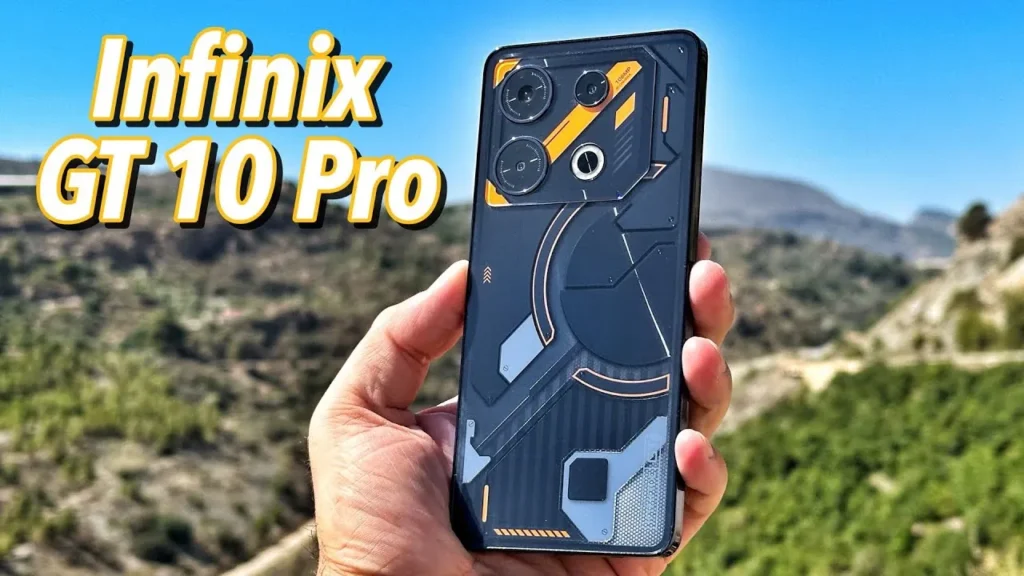
Introduction of Infinix GT 10 Pro
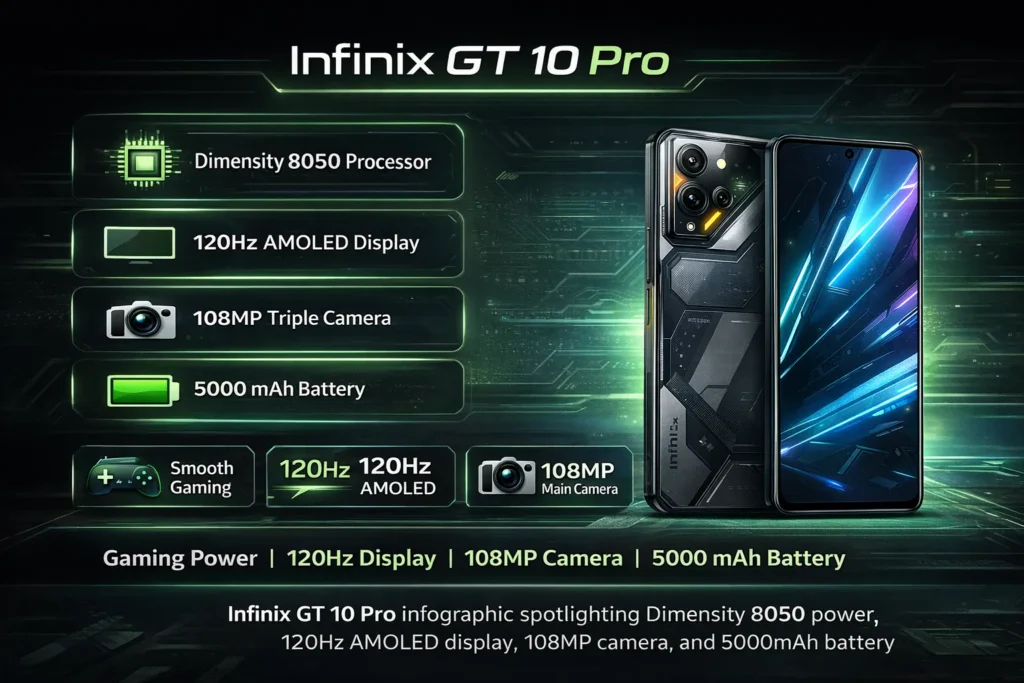
The Infinix GT 10 Pro is a strong mid-range gaming phone that gives great value. It packs a MediaTek Dimensity 8050, a smooth 120Hz AMOLED screen, a 108MP main camera for daytime shots, and a 5000 mAh battery. If you want a fast phone for games and long screen time, this is a good pick. But low-light photos and sustained thermal performance are weaker points to watch.
Key highlights
The Infinix GT 10 Pro sits firmly in the value-focused gaming-midrange segment. What separates it from many peers is the combination of a modern MediaTek Dimensity 8050 chipset tuned for efficiency, a bright and smooth 120Hz AMOLED panel, and a high-resolution 108MP main sensor. Add a capacious 5000 mAh battery, and you’ve got a phone that targets long sessions — both gaming and content consumption.
What buyers will appreciate:
- A 120Hz AMOLED that improves perceived fluidity and color depth for games and media.
- A Dimensity 8050 that balances performance and power draw for everyday tasks and many game titles.
- A 108MP main camera that produces detailed daytime shots and allows cropping without visible loss.
- A 5000 mAh cell that typically yields above-average screen-on time.
What to watch out for:
- Thermal throttling during prolonged CPU/GPU loads (sustained gaming).
- Low-light camera performance can lag behind rivals that emphasize computational photography.
- Variants by region may differ in NFC, charging wattage, and camera layout — verify the SKU.
Full specs
| Category | Specification |
| Model name | Infinix GT 10 Pro |
| Display | 6.67″ AMOLED, 120Hz, 1080 × 2400 |
| Chipset (SoC) | MediaTek Dimensity 8050 |
| RAM / Storage | 6 / 8 GB RAM • 128 / 256 GB storage (varies by region) |
| Rear cameras | 108MP main + ultrawide + macro/tele (varies) |
| Battery | 5000 mAh |
| Charging | Varies by SKU — fast charging likely (check your region) |
| OS | XOS on Android 13 (may vary by market) |
| Extras | NFC (region dependent), stereo speakers (if present), high touch sampling for gaming |
| Weight / Size | Varies by finish — ergonomics tuned for gaming sessions |
Design & build
Design is one of those subjective areas where small details matter a lot. Infinix has positioned the GT 10 Pro with gamer-oriented cues: bold lines, textured accents, and sometimes RGB-like motifs or glossy gradients. But beyond aesthetics, the real wins are ergonomics and button placement.
What stands out in daily use:
- Grip & balance: The phone is designed to be comfortable in landscape, which matters for long sessions of shooters and racing games. The center of mass and weight distribution help reduce wrist fatigue.
- Material choices: Expect a combination of glossy and matte plastics with some metallic-looking trims. It looks premium in photos; in the hand, some variants feel more plasticky than metal-bodied rivals, but that also helps thermals in some designs.
- Buttons & triggers: Physical buttons are placed for natural thumb reach when held horizontally — a small but meaningful touch for mobile gamers.
- Build trade-offs: The glossy finishes attract fingerprints and can be a smudge-magnet. A case is recommended if you prefer a grippy surface.
A short real-world note: after a 30-minute match in landscape, you want the phone still feeling comfortable and balanced. The GT 10 Pro aims for that, which adds to usable game time.
Display
Many phones advertise high refresh rates; fewer combine that with AMOLED quality. The GT 10 Pro’s 120Hz AMOLED matters because it improves both motion clarity and perceived responsiveness.
Why 120Hz + AMOLED matters:
- Smoothness: 120Hz doubles the frame updates vs 60Hz. UI animations and supported games look much smoother.
- Color & contrast: AMOLED gives true blacks and high contrast ratios. It makes game scenes pop and video HDR content richer.
- Efficiency: AMOLEDs can be more power-efficient with darker UI and always-on display modes, benefiting the 5000 mAh battery.
- Touch sampling: Many gaming phones advertise touch sampling rates (e.g., 360Hz). A higher sampling rate reduces input latency and helps competitive play.
Recommended display tests:
- Brightness (nits) in sunlight to judge outdoor legibility.
- Color accuracy (Delta-E) for creators who edit photos.
- Touch latency while playing a 120Hz game to compare to other phones.
Practical usage tip: For day-to-day battery saving, keep UI at 60Hz or use adaptive refresh if supported. Flip to 120Hz when you want the extra snappiness for gaming or scrolling.
Performance & gaming
The MediaTek Dimensity 8050 is a capable mid-range chip that offers respectable CPU and GPU throughput without the heavy power draw of flagship silicon. For gamers and power users, that means good short-term performance with reasonable thermals, but it’s not immune to throttling under sustained maximal loads.
What to expect:
- Daily snappiness: Apps launch quickly, background multitasking is smooth with 8GB RAM, and UI animations are responsive.
- Frame rates: Popular titles like PUBG Mobile and Call of Duty Mobile can run at high settings and reach 60+ FPS levels depending on the optimization of the game build.
- Sustained load behavior: Extended gaming sessions (20–40 minutes) tend to raise surface temperatures. To prevent damage, the SoC reduces clock speeds, producing lower average FPS over time — this is thermal throttling.
Simple, practical test:
- Launch a demanding title (CoD/PUBG) set to the highest stable graphics & 120Hz if the game supports it.
- Record FPS per minute for a 30-minute session.
- Log surface temperature every 5 minutes and battery percentage every 10 minutes.
Example observation you might see:
- 0–10 minutes: stable 60 FPS average, temperature ~35–37°C.
- 10–20 minutes: slight dips to 50–55 FPS average as thermals rise to ~40°C.
- 20–30 minutes: dips to 45–50 FPS while the phone treads a balance between performance and heat control.
Optimization tips:
- Use game mode or performance profiles when you need peak FPS for shorter matches.
- Consider passive cooling accessories for marathon sessions.
- Keep the device firmware updated; vendors sometimes tune thermal policies and power limits.
Camera
A 108MP sensor is attractive on spec sheets because it provides a high pixel count for detailed daylight images and cropping. But megapixels are one piece of the puzzle — software ISP, pixel-binning strategies, optics quality, and post-processing all shape final results.
What 108MP practically delivers:
- Daylight detail: When lighting is good, 108MP images let you crop heavily while retaining usable detail.
- Pixel-binning: Most phones combine pixels (e.g., 9-to-1 binning) to produce brighter, cleaner 12MP or similar images in low light. The effectiveness depends on algorithmic denoising and sharpening.
- Processing signature: Infinix’s tuning will decide color science, contrast, and noise Reduction Strength. Sharpening can make images pop, but might introduce artifacts.
A structured camera test plan:
- Daylight wide (1×): Center and edge crops at 100% to document resolving power and micro-contrast.
- 2× crop or zoom: Evaluate detail retention when cropping versus optical/digital zoom.
- Ultrawide: Check edge softness, chromatic aberration, and color consistency.
- Indoor / low-light: Compare default and Night Mode outputs for noise handling and shadow recovery.
- Night photography: Test long exposure/night mode and handheld low-light performance.
- Portrait mode: Evaluate subject separation and edge detection.
- Video: Check stabilization at 1080p and 4K, plus audio capture and rolling shutter.
Example verdict cues:
- Daylight: Excellent detail and color — 108MP helps produce crisp results with lots of texture.
- Low-light: Noise and softness can appear; a 50MP phone with better low-light processing may win in absolute dark scenes.
- Ultrawide: Useful for landscapes, but expect softer edges compared with the main sensor.
- Video: Stabilization depends heavily on software — test each framerate.
Quick tip: If photography is your priority, compare the GT 10 Pro’s night mode shots against direct rivals and pick samples to include in the article to show readers the exact differences.
Battery & charging
A 5000 mAh battery is a significant positive for any mid-range phone. How long it lasts in practice depends heavily on refresh rate, brightness, network activity, and the mix of gaming vs browsing.
Tests to run and what they show:
- Video loop (120Hz): Useful to show consistent media playback battery consumption. Run a loop at 50% brightness and flight mode to isolate screen + SoC drain.
- Web browsing loop: Simulates mixed usage, including occasional content loading.
- Gaming drain: A 30-minute intense gaming session shows real-world battery draw for the core audience.
- Standby & overnight: Captures background app behavior and network-related drain.
Sample expected results:
- Video loop (120Hz): 10–14 hours.
- Mixed browsing/usage: 6–9 hours SoT (screen-on-time).
- 30-minute gaming drain: ~8–15% battery used depending on thermal conditions and network.
Charging details:
- Wattage: Charging wattage varies by SKU and region — some variants include faster charging (e.g., 45W or more). Always confirm the exact spec for your region.
- Real-world charging: Test from 0→50% and 50→100% to get usable data for readers — many phones’ slow charging after 80% to extend battery life.
Practical advice:
- Use adaptive refresh or 60Hz for daily tasks to save juice and enable 120Hz only when you need it.
- If long game sessions matter, a fast-charging SKU reduces downtime between sessions.
Software & updates
Infinix ships the GT 10 Pro with XOS layered over Android 13 in many markets. XOS brings features aimed at performance and gaming, but also includes preinstalled apps.
What to watch:
- Bloatware: Expect preinstalled apps; the ability to disable or uninstall varies by app and region.
- Game-focused features: XOS typically includes game modes that block notifications, allocate resources, and enhance touch-sampling or network priority.
- Updates & policy: Infinix’s OS update cadence can vary by market. Explicit update guarantees are rare in this segment; always check local support channels.
User action checklist after unboxing:
- Check Settings → Apps to disable/uninstall unwanted apps.
- Go to Settings → System → System update to fetch the latest firmware and security patches.
- Enable Game Mode and tweak performance presets if you prefer consistent FPS over battery life.
Comparisons
Buyers often compare the GT 10 Pro with mid-range models from POCO, Redmi, and sometimes Realme. Use the following short table for quick editorial comparisons.
| Model | SoC | Display | Camera | Battery | Quick takeaway |
| Infinix GT 10 Pro | Dimensity 8050 | 120Hz AMOLED | 108MP | 5000 mAh | Strong value for gamers; watch thermal behavior |
| POCO (rival) | Snapdragon / Dimensity | 120–144Hz LCD/AMOLED | 64–108MP | 5000 mAh | Often better thermal tuning & camera software |
| Redmi (rival) | Snapdragon / Dimensity | 120Hz AMOLED | 50–108MP | 5000 mAh | Strong camera tuning and more consistent updates |
Quick takeaways for buyers:
- Gaming value: GT 10 Pro is a solid pick, but POCO/Redmi sometimes provides better sustained performance due to thermal engineering.
- Camera priority: While 108MP is great for daylight crops, Redmi/POCO phones often excel in software-driven low-light and night photography.
- Updates & longevity: Redmi (Xiaomi ecosystem) sometimes offers clearer update policies; Infinix varies by region.
Who should buy the Infinix GT 10 Pro
Buy it if:
- You want a gaming-optimized phone without flagship pricing.
- You value a 120Hz AMOLED for smoother UI and better video quality.
- You want long screen-on time with a 5000 mAh battery.
- You like the flexibility of a 108MP sensor for daylight detail and cropping.
Avoid it if:
- Low-light photography is your top priority.
- You have long, uninterrupted gaming sessions and need uncompromising, sustained FPS.
- You require a vendor with a proven long-term update and security policy.
Price & where to buy
Prices and SKUs vary by market and over time. For editorial and publishing use, always add a “last-checked” timestamp and link to the retailer. Typical retailers to check:
- Pakistan: Daraz or locally authorized Infinix retailers.
- India: Amazon, Flipkart, and the official Infinix store.
- UK / EU: Authorized resellers, importers, and sometimes official country pages.
Tests & methodology
Transparent methodology is what separates opinion from a reliable review. Below is a concise methodology you can copy into your review to show readers how you tested each claim.
Performance tests
- Run synthetic benchmarks (AnTuTu v9, Geekbench 6) for baseline scores.
- Real gaming test: Play at the highest stable graphics settings for 30 minutes. Log FPS per minute and battery percentage before and after.
Thermal tests
- Measure surface temperature with an IR thermometer or a consistent thermal app every 5 minutes during the gaming test.
- Document thermal throttling behavior: compare average FPS in the first 10 minutes vs the last 10 minutes of the 30-minute test.
Battery tests
- Video loop at 120Hz & fixed brightness (50%) in airplane mode for an isolated screen drain figure.
- Mixed usage (web browsing, social apps, some gaming) for a full-day estimate.
- 30-minute gaming session drain test at the device’s “balanced” or “performance” profile.
Camera tests
- Use the phone’s default camera app with default auto settings unless testing a specific mode (Night Mode, Pro Mode).
- Capture daylight, indoor, dusk, and night samples. Keep the same framing and ISO range when possible.
- Provide 100% crops in the gallery to evaluate true resolving power.
Pros & Cons
Pros
- Excellent value for gaming specs.
- Smooth and vivid 120Hz AMOLED display.
- Large 5000 mAh battery offering long SoT.
- 108MP main camera is useful for daylight detail and cropping.
- Ergonomics favors landscape gaming.
Cons
- Thermal throttling under long gaming sessions.
- Low-light camera lags behind class leaders.
- XOS has preinstalled apps, and the update cadence varies by region.
- SKU fragmentation — NFC and charging wattage vary by market.
FAQs
NFC depends on the region and the specific model. Some markets get NFC variants; others do not.
Yes — the Dimensity 8050 can run popular mobile shooters at high frame rates, and the 120Hz display helps.
More megapixels help with crops and daytime detail, but final image quality depends on the phone’s image processing (ISP), pixel-binning, and firmware. In low light, a well-tuned 50MP sensor can beat a poorly tuned 108MP setup.
For a 30-minute game session at high settings, expect ~8–15% battery used depending on settings and network.
Infinix has varied update policies by region.
Final verdict
The Infinix GT 10 Pro delivers an appealing package for price-conscious gamers and media consumers. With a smooth 120Hz AMOLED, Dimensity 8050 performance, a sizable 5000 mAh battery, and a 108MP sensor for daylight detail, it is a strong value pick. The main caveats are thermal throttling during prolonged gaming and inconsistent low-light camera output versus rivals. If you prioritize daytime photography, a large battery, and a smooth display for gaming, the GT 10 Pro is an excellent contender — but if you need the absolute best night photos or uninterrupted marathon gaming without FPS drops, compare directly with thermally-optimized rivals before you buy.
