
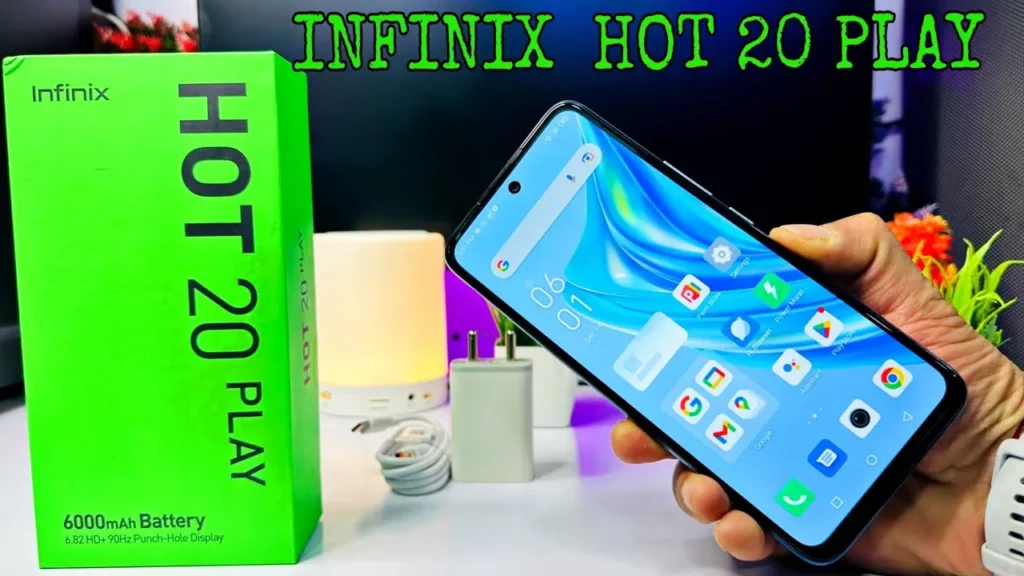
Introduction of Infinix Hot 20 Play
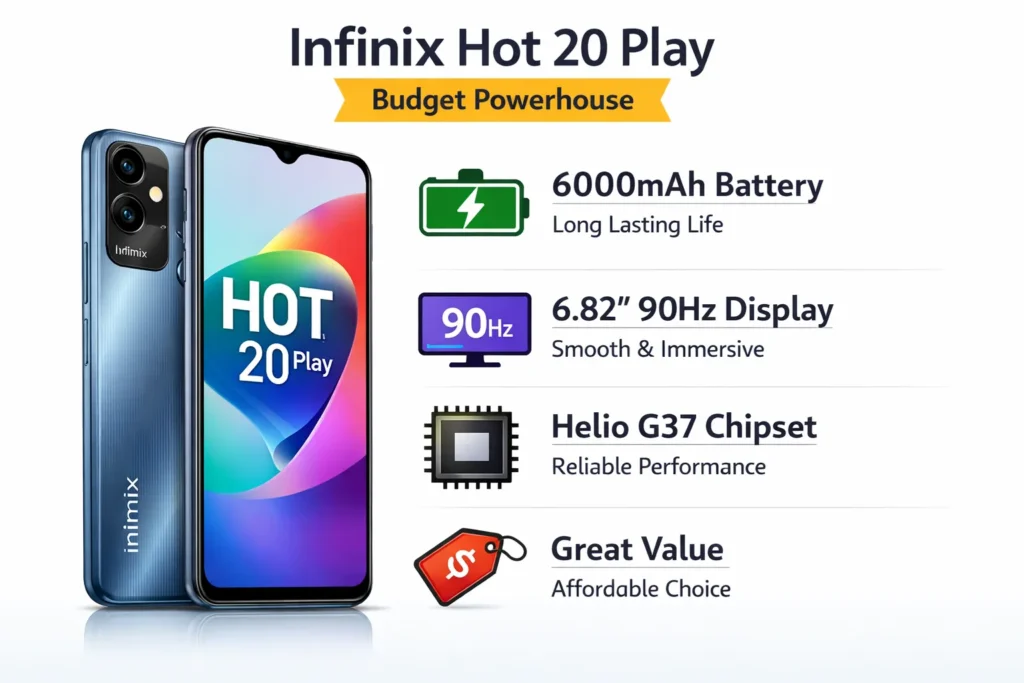
The Infinix Hot 20 Play is built for users who care more about battery endurance and screen size than premium extras. In a market full of flashy features, this phone focuses on practical value: a massive 6000 mAh battery, a large 6.82-inch 90Hz display, and dependable day-to-day performance powered by a MediaTek Helio G37 chipset. It targets students, casual users, and budget buyers who want reliable performance for calls, social media, and video streaming. If you need a long-lasting, affordable smartphone without unnecessary complexity, this detailed guide will help you decide confidently.
Key specs at a glance
| Feature | What you get |
| Model | Infinix Hot 20 Play (X6825 common SKU) |
| Display | 6.82″ IPS, HD+ (720×1640), 90Hz |
| Chipset | MediaTek Helio G37 (entry-level) |
| RAM / Storage | 4GB (plus virtual RAM options) / 64GB or 128GB, microSD support |
| Battery | 6000 mAh, 18W wired charging |
| Camera | 13 MP main + secondary helper, 1080p video |
| OS | XOS (Android 12 at launch) |
| Weight | ~209 g |
| Launch | October 2022 (model X6825) |
Design & build
When you parse the Hot 20 Play through a user-centric lens (comfort, durability, ergonomics), the phone reads like a pragmatic, battery-first device. The chassis uses plastic for both back and frame — a deliberate engineering trade-off that keeps cost and weight reasonable while accommodating a thick 6000 mAh cell.
Material & feel:
- Plastic back: not premium metal or glass, but robust and lighter. Manufacturers in this tier prioritize longevity and drop resistance over glossy, fragile finishes.
- Thickness & weight: the battery capacity increases mass and thickness compared to slim phones. Expect a noticeable slab feel, but not an overly cumbersome one.
- Finish options: glossy gradients and playful colors target younger buyers; matte finishes can reduce fingerprints and improve grip.
Durability & practical tips:
- Use an inexpensive silicone case to improve grip and mitigate slips; a case also raises the phone for screen protection if dropped.
- A camera island guard or raised bezel is helpful to avoid scuffs on flat surfaces.
- Screen protectors (tempered glass) are recommended because HD+ displays can mask scratches but they still reduce resale value.
Design verdict: The Hot 20 Play emphasizes value and endurance over premium materials. Its industrial choices reflect the device’s selling point: uptime and media consumption rather than style signaling.
Display
The display is a central part of the Hot 20 Play value story. A big 6.82-inch IPS panel and 90Hz refresh rate combine to deliver an experience that feels oversize and smoother than many 60Hz rivals — which is noticeable during social-feed scrolling and UI animations.
What 90Hz brings:
- Smoother scrolling and motion: animations, feed swipes, and system transitions have reduced motion judder versus 60Hz devices.
- Perceived responsiveness: users often report that 90Hz makes interactions feel faster even when raw CPU/GPU power is unchanged.
Resolution trade-off:
- HD+ (720×1640): pixel density ~260–270 ppi. This is acceptable for casual viewing and video playback, but it is not as crisp as 1080p screens. Expect softer text on small fonts and less detail in high-resolution images.
- For close-proximity tasks (detailed web reading or fine text), some users may prefer a 1080p competitor.
Color, contrast & daylight readability:
- IPS color profile: natural and balanced, not as punchy as AMOLED’s saturated look. Whites and midtones are mostly accurate, but blacks remain grayish in low-luminance scenes.
- Brightness: sufficient for indoor use and shaded outdoor scenarios. Full direct sunlight may reduce legibility — increasing font size or adaptive brightness helps.
- Viewing angles: IPS maintains consistent color across angles compared to earlier TN panels.
Battery implications:
- 90Hz increases refresh-related power draw. However, the 6000 mAh battery keeps net device uptime high even with 90Hz enabled.
- Tips: Use 60Hz when needing maximum endurance and 90Hz for media or social-heavy sessions.
Display settings:
- Enable 90Hz for smoother UI and social feed scrolling.
- Use 60Hz to save power during long travel or multi-day use.
- Increase font size or UI scaling if HD+ text feels small.
Bottom line: The screen is large, smooth, and great for media consumption. It’s a trade-off: big and fluid, but not the sharpest. For many users in this price band, the 90Hz 6.82″ IPS is a compelling value.
Performance & gaming
The Hot 20 Play runs on the MediaTek Helio G37 — a power-efficient, entry-class SoC Optimized for everyday apps and light gaming. Paired with 4GB of RAM (and virtual RAM expansion on some variants), the device presents a predictable performance envelope: solid for communication and content consumption; constrained for sustained 3D workloads.
Everyday usage:
- Messaging & social apps (WhatsApp, Instagram, Facebook, TikTok): fluid and reliable for routine tasks.
- Web browsing & video streaming: competent; HD streaming is fine; multi-tab heavy browsing will expose memory limits.
- Multitasking: OK for switching between a few apps; not ideal for keeping many heavy processes in memory.
Memory strategy:
- The phone can allocate storage as extra RAM (virtual RAM). This helps multitasking but is slower than physical RAM and should be treated as a stopgap, not a substitute for genuine hardware RAM expansion.
Benchmark perspective:
- Synthetic scores (Geekbench, 3DMark) will be modest. Numbers help compare peers, but do not fully predict perceived daily performance.
- For buyers, practical metrics like app cold-start time, web page load, and sustained frame rates in specific games matter more.
Gaming:
- Casual 2D games (Subway Surfers, Candy Crush): smooth, consistent.
- Light 3D titles: playable with lowered settings; acceptable frame rates.
- Modern heavy 3D shooters (PUBG Mobile, Call of Duty Mobile, Genshin Impact): playable only at low settings (30 fps target), and expect occasional frame drops and thermal throttling during long sessions.
- Sustained gaming behavior: phone heats up due to extended CPU/GPU load; the plastic body limits heat dissipation, which can trigger throttling and reduced performance.
Performance tuning:
- Enable Performance Mode only when needed (short bursts) — leaving it on drains battery and increases heat.
- Clear background apps and uninstall bloatware to free memory and storage.
- Keep 10–15% free storage to avoid storage-induced slowdowns.
- Use lightweight launchers or reduce home-screen widgets for snappier interaction.
User-level tuning checklist:
- Remove or disable unused preinstalled apps.
- Use the “Extended RAM” feature sparingly — it helps, but isn’t a cure.
- Use Game Mode (if present) to block notifications and optimize CPU scheduling.
- Lower rendering resolution or graphics presets in demanding games.
- Give the device cooling breaks during long sessions (10–15 minute pauses).
Performance verdict: The Hot 20 Play is a dependable everyday device for communication, streaming, and light gaming. It is not for performance-focused gamers or users who demand sustained high-frame gameplay under heavy load.
Camera
Imaging on the Hot 20 Play is utilitarian. The phone emphasizes battery life and display size over camera innovation. You get a 13 MP primary sensor with a secondary auxiliary sensor for depth or basic scene detection. The photographic system is designed for social media-ready photos, not for pixel-peeping or low-light mastery.
Daylight photography:
- Colors & contrast: pleasing and social-ready; colors lean natural rather than oversaturated.
- Detail: reasonable for standard social posts; aggressive cropping reduces quality noticeably.
- Dynamic range: modest; HDR helps in high-contrast scenes, but don’t expect flagship-level results.
Portraits & depth performance:
- Background blur: available via software-driven portrait mode; edge detection is serviceable but sometimes inaccurate, especially on complex hair or translucencies.
- Subject separation: better in well-lit conditions; artifacts increase in lower light.
Low-light imaging:
- Noise & softness: expect increased grain and softer details when light is low.
- Night mode (if present) improves exposure but cannot fully recover fine detail due to sensor and processing limits.
- Stabilization: lacking optical stabilization; handheld shots at low shutter speeds will show blur.
Video capture:
- 1080p video: standard and good for casual clips (Reels, TikTok).
- Stabilization: limited electronic stabilization — expect some shake. For smoother footage, use a gimbal or tripod.
- Audio: acceptable for voice capture; not studio-grade.
Practical camera tips:
- Use daylight whenever possible.
- Hold steady or use a surface/tripod for low-light video.
- Avoid digital zoom; instead, move closer physically.
- Use HDR for scenes with bright skies and dark foregrounds.
- Capture multiple frames and choose the best — computational photography can vary shot-to-shot.
Photo sample:
- Outdoor wide landscape (golden hour)
- Indoor portrait (window light)
- Low-light street shot (lamp lighting)
- Food close-up (natural daylight)
- 1080p handheld video clip (30s)
Camera verdict: Fine for social photography and casual video. Don’t buy this phone expecting pro-level photos or exceptional night imaging.
Battery & charging
Battery life is the Hot 20 Play’s primary value proposition. The 6000 mAh cell is large even by 2026 budget standards, and it translates into real-world endurance that many shoppers want.
Expected real-world endurance:
- Moderate use (social, streaming, messaging): 1.5–2 full days.
- Light use (calls, texts, occasional browsing): 2–3 days.
- Heavy use (gaming, extended video, 90Hz enabled): around 1 full day or slightly less, depending on intensity and brightness.
SOT modeling:
- With mixed usage and some 90Hz active use, users commonly see 7–10 hours SOT across a day. Video playback loops and Wi-Fi vs mobile data scenarios will shift these numbers.
Charging behavior & time:
- 18W charging is relatively slow for a 6000 mAh pack. Expect longer top-up times compared to 33W or 65W-equipped rivals.
- Charging curve: faster from 0→40% initially, then slower as it nears 100%; full recharge takes significantly longer than smaller-battery phones.
Reverse charging & extra features:
- Some firmware builds permit reverse wired charging (phone as a power bank) — a useful emergency feature.
Battery test suggestions:
- Video loop test (50% brightness, airplane mode) to measure continuous playback endurance.
- Mixed-use day test to log SOT, active apps, and time to 20%/10%.
- Standby drain test over 8 hours with Wi-Fi or mobile data to track overnight loss.
- Charging curve measurements at 0→20→50→80→100% timestamps.
Practical battery-saving tips:
- Turn off 90Hz when maximizing runtime matters.
- Use adaptive brightness or cap brightness manually.
- Disable background sync for rarely used apps.
- Use battery saver mode at around 15–20%.
- Turn off location, Bluetooth, or Wi-Fi when not needed.
Battery verdict: Outstanding. For anyone prioritizing uptime and multi-day use, the Hot 20 Play’s 6000 mAh battery is the central selling point.
Software & updates
The phone runs XOS on top of Android 12 (at launch). XOS’s customization adds value features but also includes preinstalled apps.
Feature set & UX cues:
- Themes, gesture navigation, and one-handed modes are integrated for convenience.
- Added utility features like Game Mode, dual apps, and extended RAM settings appear in the UI.
Bloatware & storage hygiene:
- Expect some preinstalled apps; many can be disabled or uninstalled. Reducing bloat improves storage and perceived performance.
Updates & security:
- Software update cadence varies by region and carrier. If Android version upgrades and security patches are important, check Infinix support channels or local retailer update histories before purchase.
Practical setup checklist:
- Remove unnecessary apps during first-boot.
- Enable automatic backups for contacts and photos.
- Install essential security apps and enable device encryption.
Verdict: XOS gives extra features at the cost of some preinstalled apps. For buyers, basic maintenance (cleanup, periodic cache clears, or factory reset after heavy use) keeps the phone fluid.
Comparison
To evaluate the Hot 20 Play, compare it along three axes: battery, display, and performance. Below are shopper personas and the alternative chipsets or device classes to consider.
Sustained CPU/GPU:
- Look for phones with Helio G85, Helio G96, or Snapdragon 6xx/7xx-class SoCs. These deliver better gaming and multitasking performance.
Better display:
- Compare with budget phones that offer 1080p (FHD+) screens or AMOLED panels. AMOLED provides deeper blacks and better contrast for movies and HDR content.
Fastest charging:
- Consider rivals with 33W, 45W, or 65W charging if quick top-ups matter; many of those phones have smaller batteries but recharge much faster.
Competitive decision matrix:
- Battery-first buyer: Hot 20 Play (6000 mAh)
- Balanced power & display: phones with Helio G85 / Snapdragon 6xx + FHD+ screen
- Photography & night shots: look for phones with larger sensors and multi-frame processing
- Fast charging & slim design: phones with smaller batteries but high-watt charging tech
Three-way example:
- Hot 20 Play — 6.82″, 90Hz, 720p, Helio G37, 6000 mAh
- Competitor B — 6.6″, 90Hz, 1080p, Helio G85, 5000 mAh
- Competitor C — 6.5″, 120Hz, AMOLED, Snapdragon 6xx, 4500 mAh, 33W charging
Verdict: Choose Hot 20 Play for endurance and a large media surface. Choose a competitor if you prioritize gaming, display fidelity, or fast top-ups.
Price & buying tips
Pricing ebbs and flows. Always refresh the price block on publish, and prefer authorized channels in countries with registration rules.
Where to buy:
- Authorized dealers or brand stores: best warranty experience and PTA/IMEI help in regions with registration rules.
- Major e-commerce platforms: likely discounts and faster deliveries; verify seller reputation and returns policy.
- Local retailers: good for in-person inspection and immediate testing on receipt.
What to check:
- SKU & model code (e.g., X6825): ensure your retailer ships the correct regional SKU with expected firmware and network bands.
- Warranty & service: local authorized warranty is worth paying a small premium.
- Included accessories: confirm whether a charger and cable are included.
Bargain tactics:
- Monitor flash sales and bank-card cashback offers.
- Compare prices across aggregator sites, and then verify seller ratings.
- Look for bundled offers (case + protector) that reduce immediate accessory spend.
Buying used:
- Inspect battery health and physical condition closely.
- Request recent photos and test the fingerprint sensor, charging port, and display for dead pixels.
FAQs
A: MediaTek Helio G37. It’s an entry-level chip for everyday apps and light gaming.
A: 6000 mAh. That gives long battery life — 1.5–2 days for normal users.
A: Yes. The IPS panel supports 90Hz, which makes scrolling and UI smoother.
A: Good for light gaming. For heavy, modern 3D games, you’ll need to lower graphics settings.
A: 64GB and 128GB models are common, plus microSD for more storage on most SKUs.
Conclusion
The Infinix Hot 20 Play stands out as a battery-focused budget smartphone built for endurance, entertainment, and everyday reliability. Its massive 6000 mAh battery, expansive 6.82-inch 90Hz display, and efficient MediaTek Helio G37 processor make it ideal for users who value long screen time over flagship-level power. While it doesn’t compete in high-end gaming, advanced photography, or AMOLED display quality, it delivers dependable performance for social media, streaming, and communication. For buyers seeking affordability, multi-day usage, and a large viewing experience, this phone remains a practical and sensible choice in the entry-level segment.
