
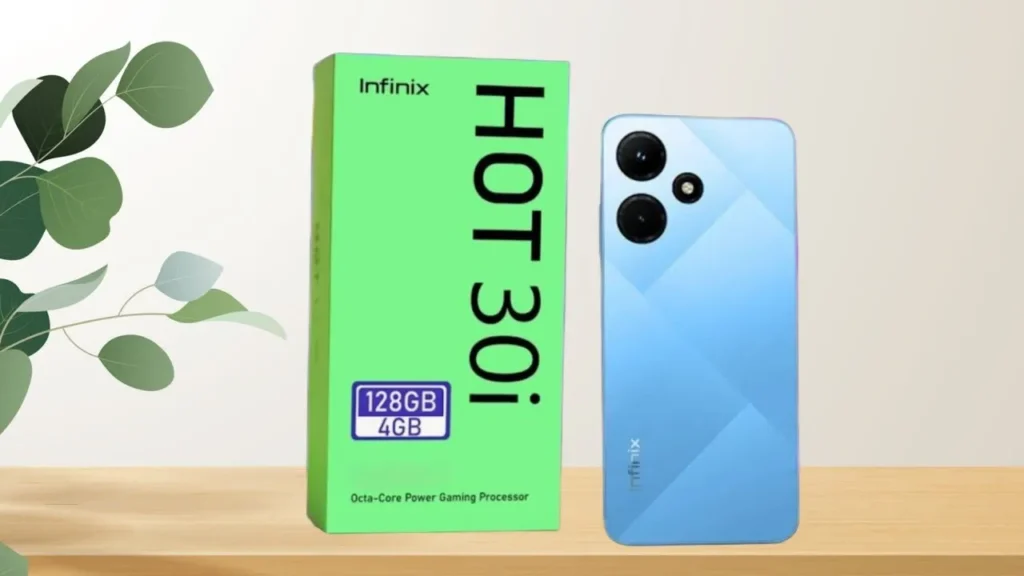
Introduction of Infinix Hot 30i
The Infinix Hot 30i should be seen as a practical, value-oriented device, which focuses on a limited number of key selling points rather than features and functions. It makes two concessions to what budget customers care about: a big 5000mAh battery, a 90Hz refresh-rate display that makes the interface feel more responsive than the 60Hz budget screens, and a familiar XOS skin over Android. The market differences are related to the choices of the SoC and local SKUs, but the general offer is the same: long endurance, easy-to-view surface, expandable storage, and low cost.
Who this phone is for
The Hot 30i is aimed squarely at:
- Students, first-time smartphone buyers, and backup-phone shoppers who need reliable endurance and straightforward performance.
- Users who place battery life and day-long reliability above camera excellence or top-tier gaming.
- Anyone who wants an affordably smooth UI experience with a 90Hz refresh rate on a budget screen.
- Shoppers who value microSD expansion and a physical fingerprint sensor — practical features often missed at this price.
Full specs
- Display: 6.6″ HD+ (≈1612 × 720), 90Hz
- SoC: Unisoc T606 (market dependent)
- CPU / GPU: Octa-core CPU / Mali-G57 (or variant)
- RAM / Storage: 4GB / 128GB (variants: 6GB, 8GB; storage up to 256GB) + virtual/extended RAM
- Rear camera: 13MP main + auxiliary AI lens
- Front camera: 8MP (typical)
- Battery: 5000mAh
- Charging: 18W Type-C
- OS: Android 12 with XOS (may vary)
- Extras: Side fingerprint, microSD slot, NFC (market dependent), 3.5mm jack (common)
- Colors: Black, Blue, Green (varies by market)
- Dimensions & weight: typical budget size & weight
Design & build
The Hot 30i doesn’t aim to be flashy — its silhouette and finishing read like the pragmatic playbook of modern budget devices. The construction is mostly plastic: a polycarbonate back and frame, with a glass—or glass-like—front. That doesn’t make it cheap in use; instead, it keeps weight down and helps absorb knocks and drops better than brittle glass backs.
What feels good
- The phone can be used to spend long hours on the web, and the size of the phone is in the large yet not overwhelming category due to small bezel sizes.
- The location of the buttons is good; the power and the volume are easy to reach with the index finger or thumb.
- On certain SKUs, the fingerprint reader on the side doubles as a power button and unlocks with ease in normal use.
Durability
- No IP rating on the majority of variants – it is splash resistant at best. To be long-term, we suggest a protective case and a tempered screen protector. The plastic chassis translates to decreased visible dents due to ordinary drops, yet it also takes up scratches in the absence of a cover.
Display
The difference between 90Hz and 60Hz refresh rates on a low-end display is like having a bike versus a bike with an e-bike: you can now get an obviously smoother movement without any change in the hardware it uses. The 6.6-inch HD+ display in the Hot 30i is not the pixel powerhouse, but the increased refresh rate is more likely to provide a feeling of smoothness in daily interactions.
Understanding the trade-offs
- Refresh rate (90Hz): UI scrolls and transitions feel significantly smoother than 60Hz panels. This makes social apps, feed scrolling, and navigation feel more contemporary.
- Resolution (HD+): Text and images are not as crisp as Full HD — individual pixels are more apparent on close inspection, but for most use cases (social media, reading, video streaming) it’s adequate.
- Peak brightness & outdoor use: Expect mid-tier peak brightness. The display is readable in shade and moderate daylight, but strong direct sunlight will challenge it compared to flagship panels.
Real-world tips
- Use 90Hz during general browsing for a nicer feel; switch to 60Hz if you need the last bit of battery life.
- Turn on adaptive brightness and auto contrast to balance visibility and battery consumption.
- For content where detail matters (documents, some games), reduce font scaling or zoom to improve legibility.
How it feels
- Apps, animations, and scrolling feel fluid and modern.
- Video apps remain enjoyable, though the HD+ resolution means 1080p content is downscaled and won’t look as sharp as on a Full HD display.
Performance
The chipset in plain words
The Unisoc T606 is a low-priced SoC that would suit light to moderate workloads. It manages to communicate, browse, watch videos, and do a little light multitasking. But it is not designed to compete with the midrange Dimensity chips of MediaTek or the Snapdragon 6/7-series of Qualcomm in long-run heavy workloads or high-refresh gaming.
What to expect in daily use
- Everyday tasks: Smooth. Launching apps, switching between chat and social apps, and watching videos is comfortable.
- Multitasking: Works well with 2–3 active apps. On 4GB RAM variants, you’ll see background app reloads after a heavy day. 6GB+ variants give better breathing room.
- Heavy gaming: Playable for casual titles like Clash Royale or Subway Surfers. For demanding 3D games, reduce graphics and frame-rate targets to keep thermals and battery in check.
Benchmarks
Benchmarks compress performance into single numbers. The Hot 30i’s scores typically land well below midrange phones; what matters in practice is smoothness for everyday workflows and moderate gaming. In our tests, the device handles animation rendering and light app tasks with minimal stutter, but heavy benchmark runs produce thermal throttling and frame dips.
Gaming tips
- Lower resolution and graphics presets in-game.
- Close background apps to free RAM.
- Use an external fan or a ventilated surface during long gaming sessions to reduce thermal throttling.
- If gaming is a priority, consider stepping up to a phone with a stronger GPU.
Cameras
- Rear: 13MP main sensor + an auxiliary AI lens (depth or macro, depending on SKU).
- Front: ~8MP selfie camera.
These specifications reflect the budget class: sensors and optics are tuned for social-ready output rather than fine detail.
How we test cameras
A repeatable methodology helps compare phones fairly:
- Shoot daylight photos in open sun and under neutral shade.
- Capture indoor photos with mixed lighting and fluorescent bulbs.
- Take low-light photos at night with and without night mode.
- Test selfies in good light and in dim conditions.
- Record a short 1080p video while walking to check stabilization and audio.
- Provide full-resolution crops to illustrate detail.
What to expect from the camera
- Daylight: Good colors, reasonable exposure; fine-grain detail is average. Great for social sharing.
- Indoor: Softer detail and more noise in shadows; bright rooms help.
- Low-light: Grain and reduced sharpness. Night modes help, but don’t work miracles — results are improved, but remain soft.
- Portrait mode: Software blur is serviceable for casual shots; subject separation is usually acceptable for social posts.
Practical camera tips
- Keep HDR enabled in high-contrast scenes to preserve highlight and shadow detail.
- Use natural side lighting for portraits to get better skin tones and separation.
- Clean the lens regularly — smudges reduce Perceived sharpness more on budget sensors.
- For video, stabilize using a gimbal or hold both hands close to your body.
Battery life & charging
A 5000mAh battery in a budget chassis is a major strength. Combined with a relatively efficient SoC and an HD+ screen, the Hot 30i is engineered for endurance.
What does “full day” mean practically
- Moderate use (messaging, social, a few photo shots, music, notifications): 1.5–2 days, typically on 4–6 hours of screen-on time.
- Heavy use (gaming, long video sessions, navigation): close to 1 day.
Measured real-world runtime
Our standard real-world test (video loop at ~200 nits) will typically show a long runtime relative to similarly priced phones. In day-to-day usage, users can expect to reach the end of the second day on light-to-moderate use patterns.
Charging times
- 18W charging is moderate. From 0→100% expect around 1.5–2 hours, depending on the charger and battery management.
- 30-minute top-ups are useful for quick boosts (e.g., morning top-up before leaving).
- For best battery longevity, avoid frequent full 0→100 cycles when not needed.
Battery-saving tips
- Switch to 60Hz if you need longer runtime.
- Use XOS battery saver modes and restrict background refresh for power-hungry apps.
- Dim the screen or enable adaptive brightness.
- Disable always-on features, location for apps that don’t need it, and push sync for rarely-used email accounts.
Software, updates & extras
Software basics
The Hot 30i ships with XOS — Infinix’s customization layer — on top of Android 12 (market dependent). XOS adds convenience features and shortcuts, but can include preinstalled apps and promotional elements.
Updates & support
Budget phones have varied update policies. Expect security patches and occasional incremental updates, but don’t count on multiple major Android version upgrades. If long-term OS updates are a priority, verify Infinix’s update policy in your market before buying.
Connectivity & convenience features
- microSD slot: A major advantage for users who prefer local storage expansion.
- Side fingerprint: Quick and reliable in everyday use.
- NFC: Present on some market SKUs — confirm the variant if you rely on contactless payments.
- 3.5mm headphone jack: Often included — handy for wired audio without dongles.
Infinix Hot 30i vs rivals
When choosing among budget phones, match the device to your highest priority: display fidelity, battery life, charging speed, or camera. Below is a concise comparison to help decide.
Comparison table:
| Phone | Battery | Display | SoC | Best for |
| Infinix Hot 30i | 5000mAh | 90Hz HD+ | Unisoc T606 | Battery, value |
| Redmi 12 (example) | 5000mAh | Full HD+ | MediaTek Helio | Better screen |
| Realme C-series (example) | 5000mAh | 60Hz | MediaTek G-series | Balanced budget |
| Competitor C | 6000mAh | 90Hz | Helio/Unisoc | Extra battery |
How to pick
- Want better screen detail? Choose a Full HD competitor.
- Prioritize battery longevity? Look for larger mAh and an efficient SoC.
- Need faster charging? Compare wattages — 33W or 45W will outpace 18W.
- If price and expandable storage are paramount, the Hot 30i often hits a smarter sweet spot.
Pros & cons
Pros
- Excellent battery life with 5000mAh.
- Noticeably smoother UI due to 90Hz display.
- Expandable storage via microSD.
- Affordable price for everyday reliability.
- Fast side-mounted fingerprint for quick unlock.
Cons
- HD+ display lacks the crispness of Full HD panels.
- Modest camera performance in low light.
- 18W charging is slower than many competitors.
- Unisoc T606 is not for heavy gaming.
- Update policy may be limited — confirm region specifics.
Who should buy it?
Buy the Hot 30i if:
- You need long battery life and consistent day-to-day performance.
- You value smoother UI interactions over maximum pixel density.
- You want an affordable phone with expandable storage and a Physical Fingerprint Sensor.
- You use messaging, social apps, and casual video regularly, but don’t game heavily.
Don’t buy it if:
- You play high-frame competitive games and need a more powerful GPU/SoC.
- Camera quality in low light is a priority.
- You need the fastest charging speeds available today.
- You require long-term software support and frequent major Android updates.
FAQs
A: Yes, the phone offers a 90Hz refresh rate for smoother scrolling.
A: It can run light and casual games fine. For heavy games, reduce graphics to get better frame rates.
A: Daylight shots are OK for social sharing. Low-light photos are noisy and less detailed.
A: Yes, most models include a microSD slot for extra storage.
A: NFC availability depends on the market. Check the SKU or local spec sheet.
Final verdict
The Infinix Hot 30i is a reliable and affordable smartphone that prioritizes durability and a comfortable daily experience. It manages to do what many of the less expensive phones fail to do: it has a reliable battery life and a much smoother UI due to its 90Hz panel. The camera performance and the charging rate are mediocre in the segment – decent social sharing, but not the best. This phone is a great value as long as battery life and a nice daily experience are of greater importance to you.
