
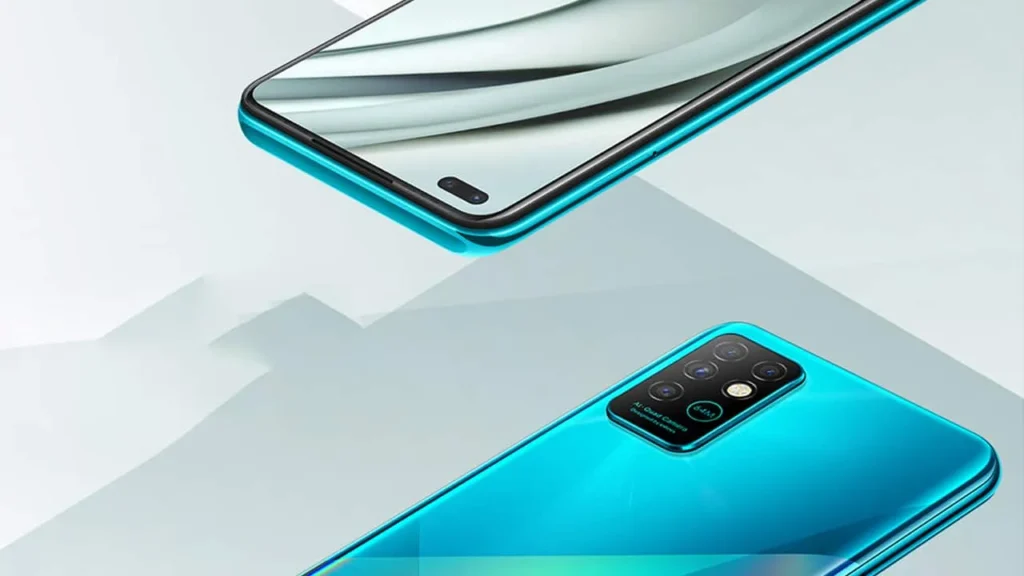
Introduction of Infinix Note 8
The Infinix Note 8 is a cost-conscious, large-display smartphone engineered for media consumption and long battery endurance. It pairs an enormous 6.95-inch IPS display with a 64MP main camera (quad array), MediaTek Helio G80 silicon, 6GB RAM and 128GB onboard storage, and a hefty 5200mAh battery with modest 18W charging. If you prioritize a big canvas for videos, long screen-on time, and solid daylight photography on a tight budget, the Note 8 represents exceptional value. If you require a pixel-dense 1080p display, flagship-level gaming, or ultra-fast charging, look elsewhere.
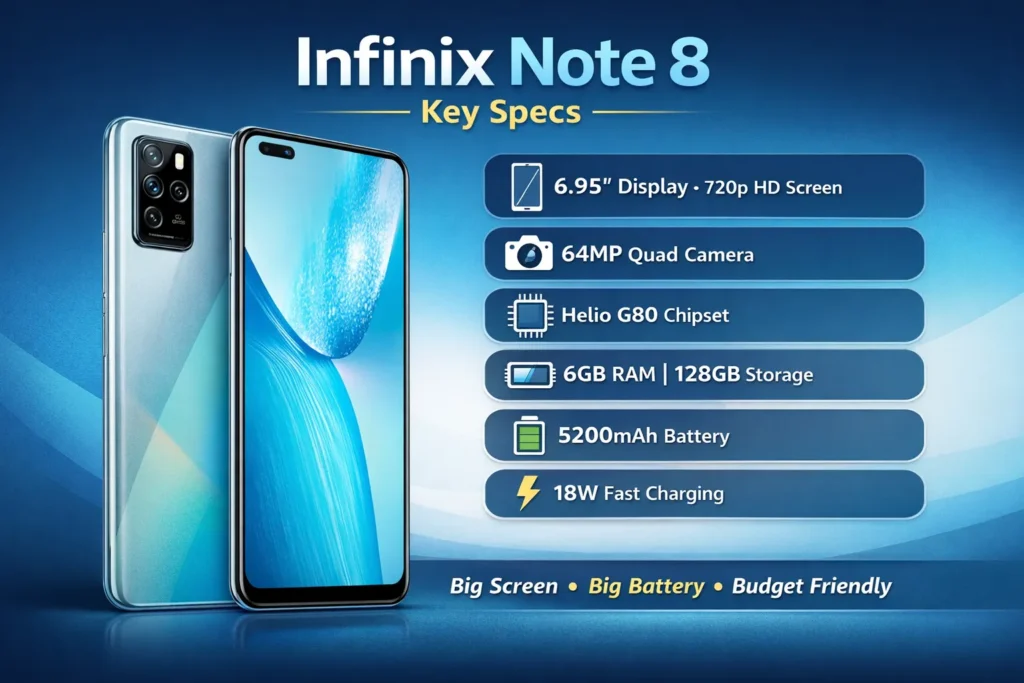
Key specs at a glance
- Model: Infinix Note 8
- Display: 6.95″ IPS LCD, 720 × 1640 px (~258 ppi), Corning Gorilla Glass (claimed)
- Chipset: MediaTek Helio G80 (Octa-core)
- RAM / Storage: 6GB RAM / 128GB storage; microSD expansion slot
- Main camera: 64MP primary + secondary sensors (ultrawide / macro/depth or similar)
- Selfie: ~16MP front-facing camera (typical SKU)
- Battery: 5200 mAh, 18W fast charging (charger in-box)
- OS: Android (XOS) — Android 10 at launch with XOS 7.x skin (verify for your SKU)
- Dimensions / Weight: ~175.3 × 78.8 × 9.0 mm; ~200g (approx)
- Typical retail price (example market): ~PKR 29,999 (Pakistan — price snapshot; varies by market & time)
Design & build
A large, budget-conscious chassis
The Infinix Note 8 deliberately goes big — you immediately notice the footprint. The frame and back are predominantly glossy polycarbonate (plastic), which keeps manufacturing costs down and reduces weight compared to metal while still offering an attractive finish. Expect fingerprint marks and smudges on glossy panels; a TPU case solves that without hiding the design.
Ergonomics
With a 6.95-inch screen, one-handed operation is awkward for most people. The device sits comfortably for two-handed media tasks (video, reading, browsing). Edges are modestly rounded to improve grip, but the phone’s length makes pocket carry somewhat cumbersome.
Buttons, sensors & ports
Common controls include a power button and volume rocker on the right, a side-mounted fingerprint sensor on many SKUs (some markets may have rear sensors), and a 3.5mm headphone jack — a useful inclusion for wired audio fans. The charging/data port varies by region; some listings show USB-C, others micro-USB — confirm with the seller. The hybrid or dedicated microSD tray is present on most units.
Build quality summary
It doesn’t feel premium like glass-and-metal flagships, but it’s solid for the price segment. If you value aesthetics, pick one of the glossy colorways (Deepsea Luster, Silver Diamond, Iceland Fantasy are examples) and protect it with a clear case and tempered glass to keep the display safe.
Display
Size vs. pixel density
What stands out is the sheer size: 6.95 inches gives an immersive viewing area for video, web pages, and gaming. The compromise is resolution — a 720p (HD+) panel yields a pixel density around ~258 ppi. Text and UI elements are readable, but you’ll notice less crispness compared to 1080p displays, especially for small fonts and fine detail. For media consumption (videos, social reels), this trade-off often makes sense: the big display and reduced resolution help battery life.
Brightness & outdoor legibility
Reported typical peak brightness values roughly sit in a decent mid-range (~400–500 nits in typical tests). That’s adequate for indoor and shaded outdoor viewing, but direct bright sunlight may reduce visibility. Corning Gorilla Glass protection (claimed) helps durability and scratch resistance; still use a screen protector to be safe.
Color, contrast & viewing angles
The IPS panel provides wide viewing angles and acceptable color reproduction for casual use. Professionals or color-critical users (photographers, color graders) will prefer higher-grade AMOLED or IPS panels with wider color gamuts.
Practical recommendation
If you want the largest screen for streaming and long battery life at the lowest cost, the Note 8 is compelling. If you prioritize sharpness and text clarity (desktop replacement reading, heavy PDF use), choose a smaller 1080p device instead.
Performance & gaming
The silicon in context
MediaTek Helio G80 is a competent budget-mid SoC designed with power efficiency and mid-tier gaming in mind. It combines CPU cores and a mid-range GPU to deliver satisfactory day-to-day responsiveness, app multitasking, and casual gaming performance.
Real-world performance
- Everyday apps: Social media, messaging, streaming video, light web browsing, and common productivity tasks run smoothly on 6GB RAM. App loading times are acceptable for the category.
- Multitasking: 6GB RAM with a relatively large 128GB storage gives generous headroom for switching between a handful of apps. Heavy multitasking with dozens of background processes will eventually show memory pressure, but typical user workflows are fine.
- Storage performance: UFS vs. eMMC varies by SKU; read/write speeds are reasonable in the category, but high-end storage throughput is not expected.
Gaming expectations
- Casual titles (Clash Royale, Subway Surfers): Run flawlessly at High Settings.
- Tougher 3D titles (PUBG Mobile, Call of Duty Mobile): Playable at medium settings. The phone can handle sustained sessions but will show thermal throttling under long, high-load play, and you’ll need to reduce frame/texture settings to maintain stability.
- Tips for smoother gaming: Enable Game Mode or performance profile in XOS, close background apps, reduce resolution/texture settings in-game, and avoid using the phone while charging to minimize thermal spikes.
Verdict on performance
Good for everyday users and casual gamers. It is not a flagship-grade gaming phone — don’t expect ultra-high FPS or maximum graphics. For the price, the balance of performance and battery life is sensible.
Battery & charging
Battery capacity vs. efficiency
A 5200mAh cell coupled with a 720p screen typically yields excellent endurance. The large battery is one of the Note 8’s core selling points.
Typical usage timelines
- Light use (calls, messaging, some browsing, background email): 1.5–2 days per charge.
- Moderate use (social media, streaming an hour or two, photography, some gaming): Around a full day and possibly into a second day depending on habits.
- Heavy use (long gaming sessions, continuous screen-on time): Expect roughly one day, with heavy gaming reducing usable hours more drastically.
Charging speed
The device ships with an 18W charger in most markets. For a 5200mAh battery, 18W is modest but serviceable:
- Estimated 0→50%: ~45–60 minutes (dependent on battery health, ambient temperature, and test methodology).
- 0→100%: ~90–120 minutes in real-world conditions.
This is not ultra-fast compared to newer 30–65W solutions, but it’s adequate for overnight top-ups and practical day-to-day use.
Battery longevity tips
- Use adaptive brightness or manually cap brightness for long sessions.
- Restrict background activity for power-hungry apps.
- Use Wi-Fi where possible instead of cellular data to conserve energy.
- Enable power saving modes during travel or long outings.
Camera
Hardware & setup overview
The Note 8’s headline spec is a 64MP main sensor. The camera stack usually includes complementary modules (ultrawide, macro, depth) and software modes like night mode and portrait mode. The primary sensor often uses pixel-binning to produce 16MP output images with enhanced light sensitivity and detail.
Daylight performance
In good lighting, the 64MP sensor excels for the class: images contain pleasing detail, reasonably balanced dynamic range, and vibrant color reproduction (sometimes slightly boosted by the XOS processing). The phone produces shareable photos for social media without much post-processing.
HDR and dynamic range
Enable HDR for high-contrast scenes — it helps preserve highlights and fill shadow detail. The automatic HDR does a decent job, but manual HDR can help in tricky conditions.
Low-light & night shooting
Low-light is the budget phone’s challenge: while pixel-binning and night modes mitigate noise, you’ll still see softness and grain compared to mid/high-end devices. Keep the phone steady, use night mode when available, and avoid digital zoom in low light.
Macro & ultrawide
The ultrawide lens (if included) expands framing possibilities but can be softer and show chromatic aberrations towards the edges. Macro lenses are often limited in resolution and sharpness — for close detail, cropping from the main sensor usually produces better results than relying on the dedicated macro lens.
Video capabilities
- Usually up to 1080p at 30fps (some SKUs may offer 1080p60 or 4K limited or absent).
- Stabilization is basic (electronic or software-assisted) — don’t expect gimbal-like smoothness.
- For the best footage, use steady hands or a tripod/stabilizer and avoid heavy pans.
Practical camera tips
- Use the main sensor for most shots — it generally outperforms secondary lenses.
- Turn on HDR for scenes with strong backlighting.
- For portraits, use natural light when possible; the depth sensor does a reasonable job, but edge detection can misbehave with complex backgrounds.
- If you want more detail in close-ups, crop from the main 16MP output rather than using the macro lens.
Software, updates & UX tips
Software experience
The Note 8 runs XOS — Infinix’s Android skin — atop Android 10 at launch. The skin adds features targeted at gamers (Game Mode), gesture navigation, and some Infinix utilities. Like many vendor skins, XOS includes preinstalled apps (bloatware), UI theming, and extra customization options.
Updates & support
Budget vendors often provide limited major Android version updates for lower-end SKUs. Verify the update policy for your region and specific SKU if long-term Android upgrades are a priority. Security patches may be issued, but the frequency varies.
Optimizing the experience
- Remove bloat: Disable or uninstall preinstalled apps you don’t use to free storage and reduce background processes.
- Use dark mode selectively: On LCD panels, dark mode primarily helps eye comfort; power savings are minor compared to OLED.
- Enable performance modes sparingly: They boost responsiveness for gaming but may increase temperature and battery draw.
- Back up regularly: Use Google backup or Infinix’s backup tools to protect photos, contacts, and settings.
Connectivity, sensors & extras
- SIM & cellular: Dual SIM (dual standby) is standard. Ensure the phone supports the LTE bands important for your carrier. No 5G in this class.
- Audio: 3.5mm headphone jack is typically present — great for wired headphones and microphones.
- Storage expansion: microSD slot allows adding storage without sacrificing a SIM on most variants.
- Biometrics: Side-mounted or rear fingerprint scanners provide quick unlocking; facial unlock (2D) is also available in software.
- No IP rating: Expect no official dust/water resistance rating. Use caution around water.
Real-world tests
Synthetic benchmarks
Helio G80 benchmarks place the Note 8 in the low-mid performance category. Single-core scores are reasonable; multi-core performance trails flagship SoCs. Benchmarks are useful for relative comparisons, but don’t always reflect everyday feel — thermal behavior, software optimization, and storage speed matter.
Battery testing
Independent tests and reviewer battery loops tend to show strong endurance thanks to the large 5200mAh cell and lower-resolution display. Expect long screen-on times in light to moderate usage.
Camera sample consensus
Reviewer galleries typically praise daylight performance and detail. Night shots are serviceable but noisy relative to higher-tier phones. Videos are fine for social clips; don’t expect cinematic stabilization.
Everyday user impressions
For messaging, social media, video streaming, and casual gaming, the device feels capable and reliable. Battery life and display size are the two most commonly cited positive attributes by owners.
Comparisons
The Note 8’s nearest rivals are other budget large-display phones and mid-segment devices that prioritize battery and camera specs. Typical competitors include:
- Tecno Camon series: Competes on camera specs and price; design and software differ.
- Redmi / Xiaomi Note series (budget models): Often offer 1080p screens at similar price points; they may outshine Note 8 on display sharpness.
- Realme Narzo / C series: Aggressive pricing and performance balances; some rivals offer faster charging or slightly better SoCs.
How Note 8 wins
- Bigger display at the price point
- Large 5200mAh battery
- 64MP primary camera as a marketing and practical advantage
How Note 8 loses
- 720p screen vs. 1080p rivals — lower sharpness
- Helio G80 is competent but not class-leading
- 18W charging is slower than some rivals offering 30W+
Who should buy the Infinix Note 8
Buy it if:
- You want a very large display for media consumption on a budget.
- Long battery life is a top priority (two-day light use is possible).
- You want a 64MP main camera for daytime photos without spending much.
- You prefer lots of storage (128GB) and a comfortable RAM configuration for multitasking.
Don’t buy if:
- You require a sharp 1080p display for detailed reading or editing.
- You need flagship-level gaming and sustained high FPS.
- Ultra-fast charging and the fastest silicon are must-haves.
- Guaranteed long-term Android version upgrades are essential.
Pros / Cons
Pros
- Massive 6.95″ screen for immersive media.
- 5200mAh battery that delivers excellent endurance.
- 64MP main camera that performs well in daylight.
- 6GB/128GB — generous memory+storage for the class.
- Headphone jack and microSD expansion supported.
Cons
- 720p resolution on a very large screen.
- Helio G80 — not a flagship chipset.
- 18W charging is modest for a large battery.
- No official IP rating; plastic build shows fingerprints.
FAQs
A: If you want a big screen and a long battery on a small budget, yes. If you need a sharp 1080p screen or top gaming, consider other phones.
A: Real users get 1–2 days for light to medium use. Heavy gaming = about 1 day.
A: Daylight photos are good for the price (64MP main). Low light is average — use night mode for better shots.
A: Yes, at medium settings. Don’t expect ultra-high fps. Use Game Mode for better stability.
A: 18W charger in the box (not super-fast but okay).
Comparison table
| Feature | Infinix Note 8 | Typical Rival |
| Screen | 6.95″ 720p | 6.4–6.6″ 1080p |
| Battery | 5200mAh | 4000–5000mAh |
| Main cam | 64MP | 48–64MP |
| CPU | Helio G80 | Snapdragon 6xx / Helio G85 |
| Price | Budget | Budget to mid |
Final verdict
The Infinix Note 8 is one of the strongest value propositions in the large-screen budget category. It offers an ultra-large display, a massive 5200mAh battery, and a capable 64MP primary camera at a price that undercuts many rivals. If your main priorities are media consumption and battery endurance rather than display pixel density or flagship-grade performance, the Note 8 is an excellent pick. If you want razor-sharp text, superior gaming performance, or the fastest charging, compare phones that prioritize those features.
