
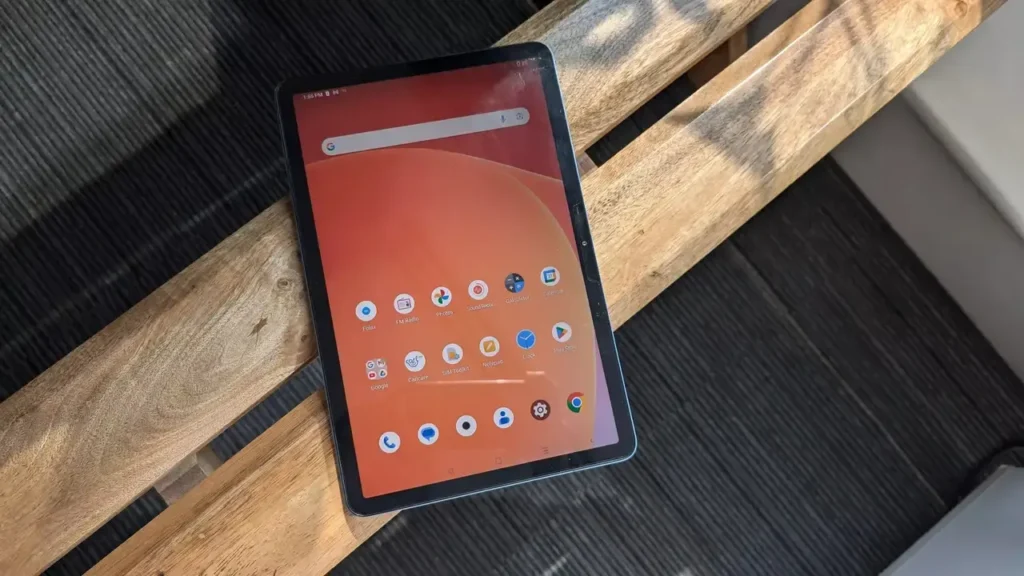
Introduction of Infinix XPAD 10
The Infinix XPAD 10 is not just another entry-level tablet crowding the budget segment. In Pakistan, it stands out because the product identity is slightly confusing, the price lands in a highly competitive bracket, and the final buying decision depends a lot on which variant you choose. Officially, Infinix Pakistan presents the device under the XPAD 10 name, while many retailer listings use the model code X1101B. In market listings, you will commonly see two trims: 4GB/128GB and 8GB/256GB. On PriceOye, the live listing for the XPAD 10 X1101B appears at Rs 49,999, which immediately positions it as a value-oriented tablet rather than a luxury or premium device.
What makes this tablet genuinely interesting is the combination of features it brings to the table. Infinix markets it around an 11-inch FHD+ display, MediaTek Helio G99, 4G LTE connectivity, Folax voice assistant with ChatGPT integration, quad-speaker stereo output, Android 14, and long-term security updates. On paper, that is a strong package for the price. In real use, the story becomes more balanced. The hands-on review highlights the build quality, near-stock software experience, cellular support, headphone jack, FM radio, and the surprisingly useful selfie flash.
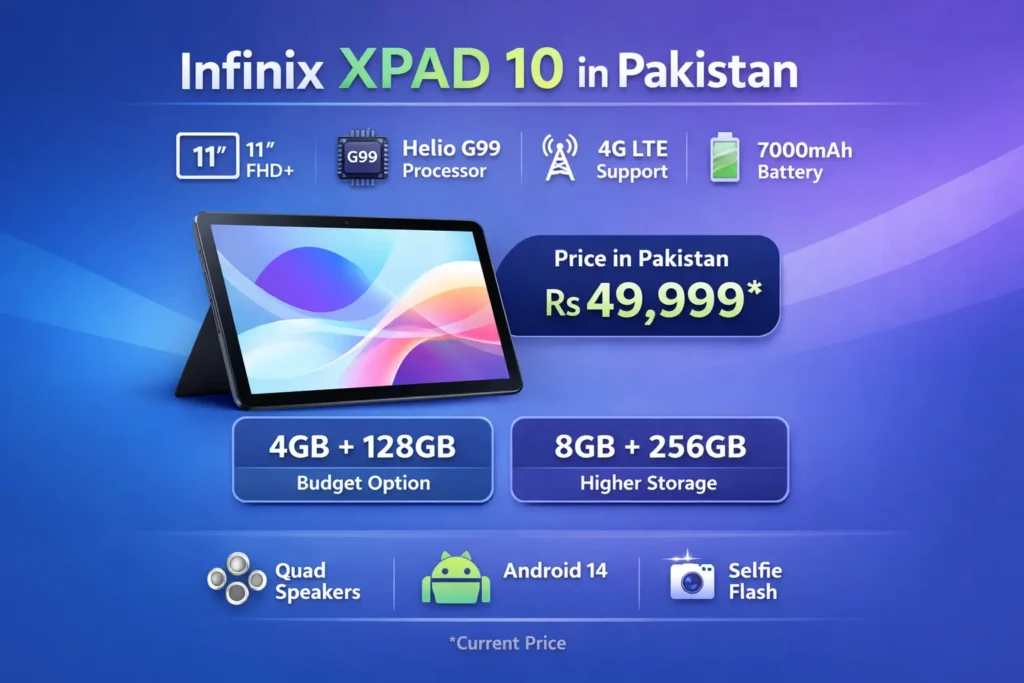
Infinix XPAD 10 Price in Pakistan
The first question buyers ask is simple: how much does it cost? Right now, the live PriceOye listing shows the Infinix XPAD 10 X1101B at Rs 49,999, with a previously listed higher price of Rs 52,000 crossed out. The page also surfaces both available memory options, including 128GB/4GB RAM and 256GB/8GB RAM, which gives buyers a clearer sense of what they are actually choosing.
That price places the tablet in a delicate and very competitive category. It is not so cheap that buyers will ignore its shortcomings, and not so expensive that it can be forgiven for missing premium conveniences. At this level, people expect more than a basic screen-and-battery tablet. They want smooth enough performance, dependable software, decent battery endurance, and practical features that justify the spend. That is why the buying guide matters so much here. A tablet in this range should not be judged only by a spec sheet. It should be evaluated by how comfortably it fits everyday use, how stable the software feels, and which storage/RAM configuration provides the best long-term value.
Current value position
At roughly Rs 49,999, the Infinix XPAD 10 sits in a segment where users usually compare it with other budget-friendly 11-inch tablets and LTE-ready devices. Price comparison pages show it being discussed alongside models such as the Huawei MatePad SE 11-Inch and Redmi Pad SE 11-Inch. That tells you something important: the XPAD 10 is competing in a crowded value tier, where it must prove itself through the mix of features, not just one standout spec.
Is It Called XPAD 10, XPAD 10 10, or X1101B?
This is one of the biggest gaps in the current search landscape, and it is also one of the first things that confuses buyers.
The official Infinix Pakistan branding uses XPAD 10. Retailer listings often use X1101B, which is the model code and not the commercial consumer name. Some users also search for XPAD 10 10, but that phrase is less precise and less clearly tied to the official naming structure. The safest way to understand the product is simple: XPAD 10 is the product name, while X1101B is the model identifier commonly used in the retailer ecosystem.
This naming clarity matters for both SEO and user experience. When someone searches “Infinix XPAD 10 price in Pakistan,” they may land on a product page that says X1101B instead of XPAD 10. If the article does not explain that relationship early, the user may feel uncertain or assume they have reached the wrong page. When the content resolves this confusion in the first section, it instantly feels more useful and more trustworthy.
Simple naming guide
XPAD 10 = the main product name
X1101B = the model code usually shown by retailers
XPAD 10 10 = a loose search phrase some users type, but not the cleanest official naming path
Infinix XPAD 10 Full Specs
Before buying any tablet, users want a quick but complete spec snapshot. The XPAD 10’s identity is shaped by a few core hardware elements: an 11-inch FHD+ display, MediaTek Helio G99 chipset, 4G LTE support, Android 14, a 7000mAh battery, and an 8MP camera setup on both the front and rear. The review also confirms XOS V14 running on top of Android 14.
Here is the simplified version of the most important specifications:
Display: 11.0-inch, 1920 x 1200 FHD+ panel
Processor: MediaTek Helio G99
Operating System: Android 14 with XOS V14
Battery: 7000mAh
Charging: 18W charging in the reviewed unit
Cameras: 8MP rear and 8MP front, with selfie flash support
Audio: Quad-speaker setup, 3.5mm headphone jack, and FM radio support
What the spec sheet really tells you
The XPAD 10 is not trying to be a luxury tablet. It is trying to be a sensible one. Its hardware mix points toward browsing, online classes, streaming, note-taking, video calls, and casual gaming. In other words, it is a practical value device with enough power to feel useful in everyday life, but not enough premium hardware to be mistaken for a flagship tablet.
Design and Display
The most immediate impression the Infinix XPAD 10 gives is its 11-inch 90Hz FHD+ display story. Infinix’s Pakistan page emphasizes the display as one of the tablet’s core features, and the review supports that by listing the 90Hz screen as one of the clearest strengths. That matters because a tablet is fundamentally a visual device. People use tablets to read, watch, browse, sketch, attend classes, and handle light productivity. The screen affects every one of those experiences.
A 90Hz refresh rate is especially important in this category. It makes scrolling feel smoother, gestures appear more responsive, and the interface generally feels less dated than a basic 60Hz panel. Combined with the 11-inch size, the XPAD 10’s display should feel comfortable for reading articles, watching videos, checking documents, and managing split attention between apps.
The review also gives the tablet credit for its solid build quality. That is a meaningful point because many budget tablets feel flimsy, hollow, or excessively lightweight in a way that makes them seem cheap. A sturdier body helps the XPAD 10 feel more reliable in hand, especially for students, families, and users who move the tablet from room to room, school to home, or work to leisure.
Why the display matters so much
For a tablet, the display is not just a feature; it is the product. If the screen is weak, dull, or uncomfortable, the whole device feels compromised. The XPAD 10’s 11-inch FHD+ panel and 90Hz refresh rate are therefore central to its value proposition. They are not side notes. They are one of the main reasons a buyer might consider it over another tablet in the same range.
Display strengths
The screen is large enough for reading, browsing, and split attention use.
The 90Hz refresh rate makes the moves feel smoother than standard budget panels.
The FHD+ resolution is better suited for text, video, and classroom use than low-resolution alternatives.
Display weakness to note
The review notes that the tablet does not include adaptive brightness. That can become annoying in day-to-day use because the display may not adjust as intelligently when you move between bright rooms, shaded areas, and dim environments. For many users, this is a small but noticeable convenience loss.
Performance and Everyday Use
The MediaTek Helio G99 is a familiar chip in the value tablet and Budget-Performance space. The XPAD 10, it gives the tablet enough muscle for typical tasks such as browsing, streaming, chatting, reading, note-taking, and jumping between light apps. The official page treats the chipset as a key selling point, and the review suggests the tablet handles daily use adequately, with casual gaming being the realistic expectation rather than heavy gaming.
In practical terms, this is the kind of tablet that should satisfy students, casual users, and households that want a reliable multimedia screen. It is not designed to compete with high-end productivity tablets or gaming tablets. According to the review, app switching is generally acceptable, but memory management is not especially strong, and too many open apps can make the experience less fluid. Scrolling also showed occasional stutter. That tells you the hardware is good enough for typical use, but the optimization is not flawless.
Best use cases for performance
Online classes
Reading and research
YouTube, streaming, and casual browsing
Office-style light productivity
Casual games rather than graphics-heavy titles
Not the best fit for
Heavy 3D gaming
Fast, premium-style multitasking
Users who expect consistently high-end tablet fluidity
Real buying takeaway
If you judge the XPAD 10 by value, it makes sense. If you judge it like a premium tablet, its limitations become visible quickly. That is why the best article about this tablet should not oversell it. It should help the buyer understand where it fits, what it can do well, and where the compromises begin.
Battery Life and Charging
The XPAD 10 includes a 7000mAh battery, which is one of its strongest selling points. For a tablet in this segment, battery size is a major part of the appeal. A large battery makes the device more suitable for long reading sessions, back-to-back lectures, movie marathons, travel, and all-day home use. The review confirms the battery capacity and suggests the tablet can deliver solid endurance for normal media consumption.
The trade-off appears in charging speed. The review also confirms 18W charging, which is acceptable but not especially fast for a tablet with this large a battery. That means the device can last a long time, but it will not necessarily refill quickly. In real life, that matters. It means planning your charging routine becomes a little more important than it would be on a faster-charging device.
Battery pros
The 7000mAh battery is a major strength.
It is well-suited to video streaming, reading, and study sessions.
It works nicely for all-day home or school usage.
Battery cons
18W charging is not especially quick for a tablet with this capacity.
You should not expect rapid top-ups between sessions.
Battery verdict
The battery is one of the XPAD 10’s biggest advantages, while charging speed is one of its clearest weaknesses. That balance is exactly the kind of thing a buyer should understand before deciding whether the tablet is worth the asking price.
Cameras and Video Calls
Tablet cameras are rarely the primary reason someone buys the device, and that is still true here. The Infinix XPAD 10’s cameras are basic, but they are functional enough for practical use, such as video calls, scanning documents, online classes, and quick snapshots. The review lists 8MP rear and 8MP front cameras, and it also mentions a selfie flash, which is a surprisingly useful addition for low-light video calls and face-to-face communication in dim rooms.
The camera experience is honest rather than impressive. The review indicates that the photos are serviceable, not exceptional. Fine detail is limited, colors may appear overly vibrant, and video output is average. That is perfectly fine for a tablet in this category, but it also means serious photography users should look elsewhere.
What the cameras are good for
Video calls
Online learning sessions
Document scans
Simple casual photos
Low-light front-camera helps through the selfie flash
What they are not good for
Serious photography
Professional video creation
Content creation that depends on strong camera output
Software, Android 14, and Folax AI
One of the more attractive parts of the XPAD 10 story is the software experience. The official page highlights Folax with ChatGPT, and the review confirms Android 14 running with XOS V14. For a budget tablet, that is a powerful message because it gives the device a more modern identity than many older or heavily customized competitors.
The review describes the interface as close to stock Android, which many users will appreciate. A cleaner software feel generally makes a tablet easier to use, less overwhelming, and more comfortable for students, families, and everyday buyers. This is often a major advantage over cluttered or overly aggressive custom skins.
Why Android 14 matters
Android 14 makes the tablet feel more current. It helps the XPAD 10 feel relevant now instead of outdated at launch. The official Pakistan page also highlights two years of security patches, which improves confidence for users who plan to keep the device for a while.
Software strengths
The interface feels practical and relatively clean.
Android 14 is modern and up to date.
Folax with ChatGPT gives the tablet a more AI-friendly brand image.
Two years of security patches improve long-term trust.
Software weakness
The review still notes occasional stuttering during scrolling and app switching. So while the software is appealing on paper, the actual feel is not perfect in every situation.
Features That Make the XPAD 10 Stand Out
The XPAD 10 includes several practical touches that help it stand out from an ordinary budget tablet.
4G LTE support
The official page highlights 4G LTE connectivity, and that is a real advantage. It makes the tablet useful on the move without depending entirely on Wi-Fi. For students, field users, and people who frequently move between locations, this adds substantial flexibility.
3.5mm headphone jack
The review notes the presence of a 3.5mm headphone jack, and that still matters. Many users prefer wired earphones because they are affordable, reliable, and convenient. It also pairs well with FM radio support.
FM radio
FM radio is not a headline feature for everyone, but it is a handy extra. For users who still value offline radio access, it adds a nice old-school convenience.
Quad speakers
The speaker setup is one of the reasons the XPAD 10 can work well for entertainment. The review describes the sound as room-filling and enjoyable, which is exactly the kind of audio experience that matters for video, music, lectures, and YouTube.
Selfie flash
A selfie flash on a tablet is not something everyone expects, but it is genuinely useful. It improves front-camera usability in dim lighting and makes the device more practical for calls in darker rooms.
Which Infinix XPAD 10 Variant Should You Buy?
This is one of the most important decisions in the buying process. The live listing shows 4GB/128GB and 8GB/256GB options, both under the same X1101B identity on retailer platforms.
Variant comparison table
| Variant | Best For | Buying Mood |
| 4GB / 128GB | Basic study, browsing, YouTube, light daily use | Best value if your needs are simple |
| 8GB / 256GB | Heavier multitasking, more apps, longer ownership | Better comfort if you want more breathing room |
The table above is the easiest way to think about it. The 4GB/128GB version is the budget-friendly value choice. It makes sense for students, home users, and anyone who mainly browses, streams, reads, and uses light apps. The 8GB/256GB version is the smarter comfort choice if you want more storage headroom, better multitasking comfort, and a tablet that feels less cramped over time.
My practical recommendation
Buy the 4GB/128GB model if your usage is simple and your budget is tight.
Buy the 8GB/256GB model if you want more storage space and a smoother long-term experience.
That recommendation fits the XPAD 10’s overall personality. This is not a power-user tablet. It is a valuable tablet. The right variant choice should match your habits, not just the lower price tag.
Pros and Cons of Infinix XPAD 10
Pros
11-inch FHD+ display with 90Hz refresh rate
Helio G99 delivers decent everyday performance.
4G LTE support adds real mobility
Android 14 makes the device feel current.The
7000mAh battery supports long usage sessions
3.5mm jack, FM radio, and quad speakers improve convenience
Selfie flash helps in low-light calls.
Cons
No face unlock or fingerprint unlock on the reviewed unit.
No adaptive brightness
Charging is slow for the battery size.
No official accessories were noted in the review.
Performance is good for casual use, not heavy gaming or premium multitasking.
Best Alternatives to Infinix XPAD 10
If you are comparing tablets in this budget, the XPAD 10 is not the only name worth considering. Price comparison pages place it in the same conversation as the Huawei MatePad SE 11-Inch and Redmi Pad SE 11-Inch, which helps define the market space it occupies.
When to look at alternatives
Consider another tablet if you want:
Faster charging
Better biometric unlocking
A more refined display experience
Stronger gaming or multitasking performance
A more premium overall feel
When XPAD 10 still makes sense
Choose the XPAD 10 if you want:
A tablet with 4G LTE
A large 11-inch screen
A modern Android 14 base
A strong value proposition in Pakistan
A practical device for study, streaming, browsing, and daily use
FAQs
The live PriceOye listing shows the Infinix XPAD 10 X1101B at Rs 49,999.
Yes, in practical market terms, XPAD 10 is the product name while X1101B is the model code commonly used by retailers.
Yes. The official Pakistan page highlights 4G LTE connected support.
It is suitable for casual gaming, but the review suggests it is not ideal for graphics-heavy or highly competitive gaming.
The 4GB/128GB model is the better value choice. The 8GB/256GB model is better if you want more storage and more comfort for heavier everyday use.
Conclusion
The Infinix XPAD 10 is a value-focused tablet that gets many of the important basics right. The branding may appear as XPAD 10 on the official page and X1101B in retailer listings. Still, the purchase story remains the same: this is an 11-inch, 4G LTE, Helio G99, Android 14 tablet designed for study, entertainment, browsing, and light multitasking. PriceOye currently shows it at Rs 49,999, with 4GB/128GB and 8GB/256GB variants available. The review confirms the tablet’s strengths: solid build quality, near-stock Android feel, 90Hz screen, cellular connectivity, 3.5mm headphone jack, FM radio, and a useful selfie flash. It also confirms the weak points: no biometric unlock, no adaptive brightness, slower charging, and limited premium behavior when pushed.
