
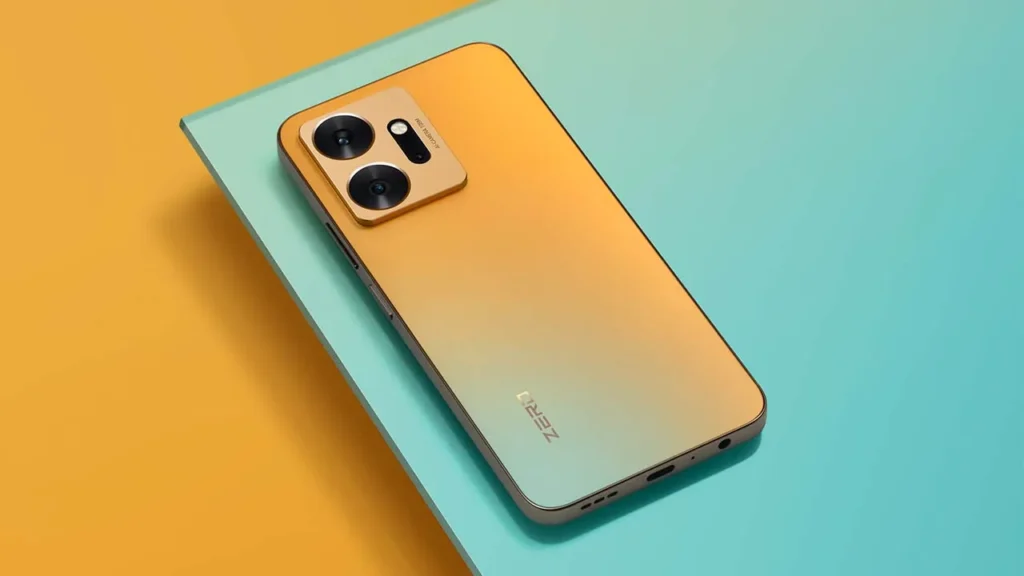
Introduction of Infinix Zero 20
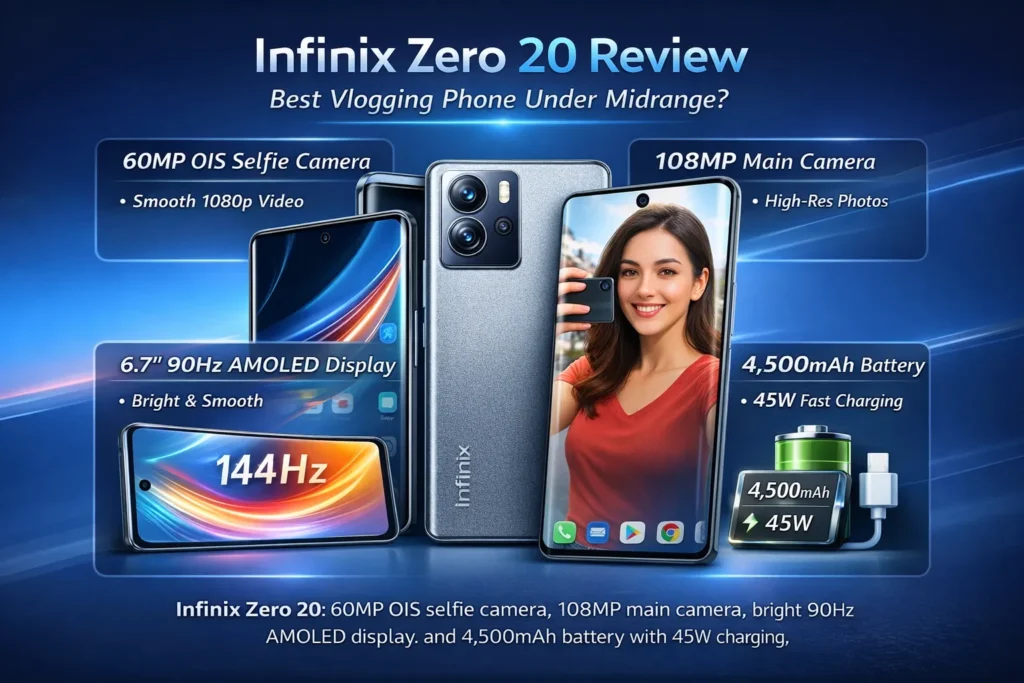
The Infinix Zero 20 has a specialized inference engine tuned for creators. Its distinguishing feature is a 60MP OIS front sensor that behaves like a high-resolution encoder with built-in stabilization — ideal for selfie-video inference (vlogging). The rear 108MP main sensor produces high-fidelity stills that let you crop (subtoken-level inspection) without losing fine-grained detail. The 6.7″ 90Hz AMOLED is a high-bandwidth preview layer for immediate visual feedback. Under the hood, a MediaTek Helio G99 provides competent throughput for everyday tasks but is not a high-compute training rig for sustained gaming workloads. A 4,500 mAh cell plus 45W charging is effective for rapid top-ups between recording sessions.
Framing the review
To make this review maximally actionable for content teams and technically literate creators, I’ll translate the usual product-review flow into an NLP-inspired pipeline. Consider the phone as a system with components that map onto NLP concepts:
- Dataset → Camera samples (selfies, ultrawide, low-light shots, videos). These are the raw data that the model (you) will later fine-tune or publish. Collect representative samples across lighting and skin tones (diverse input distribution).
- Model architecture → Hardware stack: sensors, SoC, display, battery, and mechanical design. Each module contributes to latency, throughput, and robustness.
- Training / Validation → Real-world shooting, repeated runs, stress sessions (warmth and thermal profiling), and lab-style benchmarks.
- Inference → Everyday use: recording, editing on mobile, quick publishing. Latency (app launch, camera startup), jitter (stabilization), and energy consumption all matter.
- Evaluation metrics → Photography/Video metrics analogous to NLP scoring: PSNR/SSIM-like proxies (detail retention in crops), color fidelity (calibration), stabilization variance (temporal jitter), run-time throughput (SOT), and charging curve (charging slope).
- Explainability → Workflow, recommended settings, and step-by-step how-to for creators (so readers can reproduce good results reliably).
- Deployment → Publishing the final product: compressed exports, thumbnails, and platform-specific variants.
This structure keeps the review reproducible and oriented to decisions: Is this phone the right model to deploy for your content pipeline?
Quick specs
- Display: 6.7″ FHD+ AMOLED, 90Hz
- Chipset: MediaTek Helio G99
- RAM / Storage: typically 8GB / 128GB or 256GB (expandable)
- Rear cameras: 108MP main + 13MP ultrawide + 2MP depth/macro
- Front camera: 60MP OIS selfie
- Battery: 4,500 mAh
- Charging: 45W wired
- Software: XOS on Android (reported Android 12 at launch — confirm)
- Connectivity: 4G LTE (no 5G in supplied spec)
- Weight / Dimensions: placeholder — confirm physical weight and exact dimensions before publishing
System design & ergonomics
From an NLP-engineering lens, the chassis and ergonomics are the system’s physical topology: port locations, mass distribution, and grip surfaces determine whether long-form inference (recording) will be stable. The Zero 20 presents slim bezels, a centered front punch-hole, and a camera island that reads like a compact module — visually discrete and well-integrated.
Why it matters (operationalization): When you perform long-form handheld recording (minutes of steady walking and talking), weight distribution and hand-feel are the primary determinants of micro-motion noise and user fatigue. The Zero 20 is described as being balanced for vlogging — holdability matters just as much as stabilization algorithms.
Visual audit checklist:
- Hero shot: front + back at 45° (hero image for the article lead).
- In-hand rig: selfie recording pose, held with both hands.
- Close-ups: camera island, physical buttons, SIM tray (hybrid vs dedicated), charging port (USB-C), speaker grille.
- Macro texture: back material finish and fingerprint propensity.
Display
In an NLP production pipeline, the display is your monitoring console and validation tool. A 6.7″ 90Hz AMOLED provides low-latency preview and a smooth UI sampling frequency for scrubbing and framing. AMOLED technology also affords deep blacks (excellent contrast) for faithful previewing of footage and stills.
Testing checklist:
- Measure peak brightness in auto vs manual; test sunlight legibility by photographing the preview screen under direct sunlight.
- Run a color-check pass: compare screenshots of known targets (sRGB / P3 test images) to a calibrated reference if you have a colorimeter.
- PWM & motion artefact inspection: observe screen at multiple brightness levels for flicker or ghosting, important for long-term recording and for creators with flicker sensitivity.
Reader takeaway: The 90Hz panel is an effective compromise — smoother than 60Hz UI motion while consuming less power than 120Hz alternatives. For creators who preview footage and grade on-device, the AMOLED panel is a practical studio monitor—compact but accurate enough for on-the-go grading when paired with conservative color-correction later in the editing suite.
Throughput & latency
View the Helio G99 as the device’s inference engine. It’s optimized for energy efficiency and everyday throughput rather than sustained, heavy compute. In typical creative workflows — Camera Capture, quick editing on mobile apps, and social uploads — the G99 provides adequate real-time performance.
What to evaluate:
- App lifecycle latency: measure camera app cold start and warm start times; evaluate app switching behavior with 3–5 concurrently loaded applications (camera, editor, messenger, browser).
- Synthetic metrics: PCMark-type productivity runs and 3DMark Wild Life to profile GPU performance. These anchor expectations rather than dictate real-world usage.
- Sustained gaming load: measure average FPS during a 20–30 minute session in a demanding title (log FPS histogram and thermal surface temperatures). Use a thermal camera or IR thermometer to collect surface temps.
- Throttle test: long CPU stresses to observe frequency rollback and thermal dissipation strategies.
Practical guidance: For casual to moderate gaming and for heavy camera tasks, the Helio G99 will mostly suffice. If your pipeline includes extended local rendering (e.g., multi-track mobile rendering, long-form gaming streams), prefer a phone with a stronger SoC designed for sustained performance.
Power envelope
Consider the battery as a power budget allocator. The 4,500 mAh cell plus 45W wired charging means the device can sustain a day’s worth of varied workloads and can be rapidly replenished between sessions.
Charging curve and SOT:
- Charging curve capture: log percentage at 0, 10, 20, 30, 50, 80, and 100% — produce a charging-curve chart for readers.
- Screen-on time (SOT) profiles: light, moderate, heavy usage profiles.
- Light: calls, chat, browsing — expect ~1.5 days in the supplied spec.
- Moderate: camera usage, social apps — roughly 1 day.
- Heavy: gaming + camera → less than a day.
- Best practices: recommend charging to 80% for daily cycles and keep the number of full cycles low for longevity.
Editor tip: 45W charging is practical in production environments — a 20–30 minute top-up can meaningfully extend runtime between shoots.
Cameras
This is the phone’s primary “model” for creators. The 60MP OIS front sensor is the headline — treat it as a specialized encoder for front-facing inference. The rear 108MP sensor is the high-resolution capture engine for stills.
Why the 60MP OIS selfie matters
Most phones treat the selfie camera as a peripheral; the Zero 20 treats it like a principal data source. OIS on the front sensor reduces micro-motion jitter during handheld walking shots, which directly reduces post-processing stabilization needs and increases usable frames straight out of the device.
Implications for creators:
- Higher resolution stills from the front afford cropping/correction for thumbnails and tight framing.
- Stabilized front video reduces the need for gimbals for short on-the-go shoots.
- For social-first vertical content, stabilized 1080p@60 front capture is generally the sweet spot.
Testing plan
Treat your camera test set like an NLP benchmark dataset: design for diversity, edge-cases, and repeatability.
Selfie Photo Set:
- 10 daylight selfies across varied backgrounds and skin tones.
- 5 backlit selfies to exercise HDR and exposure pull.
- 10 low-light selfies, with and without night modes.
- Maintain consistent camera settings and distances; log exposure metadata where possible.
Selfie Video Test:
- Walk-and-talk 1080p@60 handheld for 60–90 seconds (repeat runs, OIS on vs off).
- Stationary talking-head clips with and without supplemental lighting.
- Audio capture test: internal mic vs external lapel mic (if available).
Rear Camera Set:
- 108MP daylight stills with contextual subjects (portrait, landscape, close-up textures).
- Ultrawide field-of-view day and night shots.
- Macro close-ups demonstrating autofocus and detail retrieval.
Video Tests (rear):
- 4K@30 capture (if supported); check bitrate and stabilization behavior.
- 1080p@60 stabilization test and rolling shutter check.
- Ambient sound capture in noisy locations to check mic DSP behavior.
Presentation and reproducibility:
- Offer full-resolution downloads as a ZIP for journalists and pixel-peepers.
- Provide side-by-side 1:1 crops for detailed analysis.
- Embed short video stabilization clips (30–60 seconds each) for quick human evaluation.
What to analyze
Analogous to model evaluation, quantify aspects of image/video outputs.
- Exposure & dynamic range: how well are highlights preserved? Observe clipping in skies vs shadow detail retention in shaded areas.
- Color & white balance: Are skin tones natural across lighting conditions? Does the device bias warm or cool in automatic modes?
- Noise reduction & detail: inspect 1:1 crops for texture preservation and denoiser artifacts (plastic or painted textures).
- OIS effectiveness: quantify frame-to-frame jitter reduction in walking tests; present motion-trajectory plots or visually obvious side-by-side stabilization clips.
- Video stabilization: Is the footage upload-ready, or does it require additional gimbal-based smoothing?
Short verdict on imaging: The front camera is the Zero 20’s headline feature. Expect strong selfie stills and especially usable, stabilized selfie video. Rear cameras deliver solid daylight performance; low-light capabilities are respectable but not class-leading.
Vlogging pipeline
Turn the phone into a production node with this practical, reproducible pipeline. Think in terms of an NLP microservice: capture → preprocess → transform → publish.
Pre-capture configuration
- Set front camera to 1080p@60 for smooth social output unless you need slow motion or archival 4K.
- Ensure OIS is enabled; toggle any “EIS” or “stabilization” modes if the app exposes them.
- Turn on gridlines to aid composition (rule-of-thirds).
- Use HDR for extreme contrast scenes.
Capture best practices
- For walking shots, hold the phone close to your chest with both hands to minimize large oscillations.
- For talking-heads: stabilize the phone on a tripod or a stable surface, and alternately test handheld for OIS evaluation.
- Consider a lavalier pickup for consistent audio; the internal mic may suffice for ambient sound, but an external mic helps voice clarity.
On-device quick edits
- Fast editing: CapCut, VN, or Adobe Premiere Rush for quick trims and exports.
- Color: Lightroom Mobile for stills; use conservative LUTs on-device and defer final grading to desktop if possible.
- Export settings: 1080p H.264 at 10–15 Mbps for social uploads; use 4K archives ata higher bitrate if you want master files.
Deployment
- Vertical short-form: crop to 9:16 with captions embedded for accessibility.
- YouTube: upload at 1080p or 4K; use the highest-quality stills from your 108MP rear captures for thumbnails.
- For multi-platform distribution, maintain a master 4K file and derive platform-optimized versions to preserve quality.
Example micro-project (5–10 minute video):
- Record a 6–8 minute walking intro at 1080p@60 with the front camera (primary asset).
- Capture complementary B-roll with rear 108MP mode for still thumbnails.
- Edit: trim down to 2–3 minutes in CapCut, add music, color grade, and add subtitles.
- High-res 1080×1920 thumbnail cropped from the 108MP still.
Software layer
In system terms, XOS is the OS layer, and bundled apps are the auxiliary packages. They introduce friction (bloatware), but also sometimes expose useful utilities.
Recommendations:
- Disable or uninstall unused preinstalled apps to reduce background services and permission creep.
- Audit camera & microphone permissions for privacy — particularly if you intend to share footage with cloud services periodically.
- Confirm Infinix’s update policy for security patches and major Android upgrades before purchase if OS support matters to you.
Connectivity & extras
These are the network-level considerations for multi-market deployments.
- Dual-SIM behavior: confirm whether the second SIM slot is hybrid (microSD or SIM) or dedicated — this affects storage expansion vs dual-network usage.
- NFC: required for contactless payments in many markets — verify per-region spec.
- Bands & carrier support: Collect exact LTE band support tables for each SKU if you publish regional buying guides.
Comparisons
Concise decision-driving snippets in an actionable format.
Zero 20 vs Typical 5G Midranger
- Zero 20: superior selfie video experience (60MP OIS), AMOLED preview layer.
- 5G rival: network future-proofing and often better peak compute for gaming.
- Decision: pick Zero 20 for creator-first workflows; pick a 5G rival if you need network speed and raw processing for multi-hour gaming.
Zero 20 vs Gaming-focused midranger
- Zero 20: camera-first design and balanced SoC.
- Gaming midranger: superior thermal design and sustained high FPS.
- Decision: gamers should prioritize a gaming phone; creators should go Zero 20.
Pros & Cons
Pros
- 60MP OIS front camera — rare and useful for mobile creators.
- 108MP main sensor — high-res capture for detailed stills and cropping.
- 6.7″ 90Hz AMOLED — accurate preview for mobile grading.
- 45W charging — rapid replenishment for busy days.
- Balanced everyday performance.
Cons
- No 5G connectivity (per supplied spec) — check market variants.
- Helio G99 is not the best SoC for prolonged, GPU-heavy gaming sessions.
- Low-light rear performance is good but not industry-leading.
FAQs
A: Yes. The 60MP OIS selfie camera stabilizes handheld front-facing video, making it a strong choice for vloggers.
A: Based on the supplied spec sheet, it ships with 4G LTE only.
A: The 4,500 mAh battery should last a full day with moderate use. Heavy camera or gaming use reduces runtime. 45W charging helps top up fast and is useful between shoots.
A: It handles casual and mid-level gaming fine. For long, demanding sessions at high settings, a phone with a stronger gaming SoC will perform better.
A: Front-camera stabilization is usually focused on 1080p; check the camera app for 4K selfie support.
Conclusion
In production terms, the Infinix Zero 20 is a narrowly focused inference node that emphasizes front-facing capture for creators. It chooses to allocate resources to a 60MP OIS selfie camera and a high-quality 108MP main sensor, coupled with an AMOLED preview layer and a pragmatic power system. The Helio G99 delivers competent throughput for the common creative tasks — capture, light editing, and rapid deployment — but does not aim to be a compute-heavy gaming workstation. For creators who prioritize selfie-stabilized footage, quick mobile workflows, and a pleasant on-device preview experience, the Zero 20 is a compelling choice in the midrange cohort. If you need 5G connectivity or marathon gaming performance, evaluate alternative phones focused on those priorities.
