
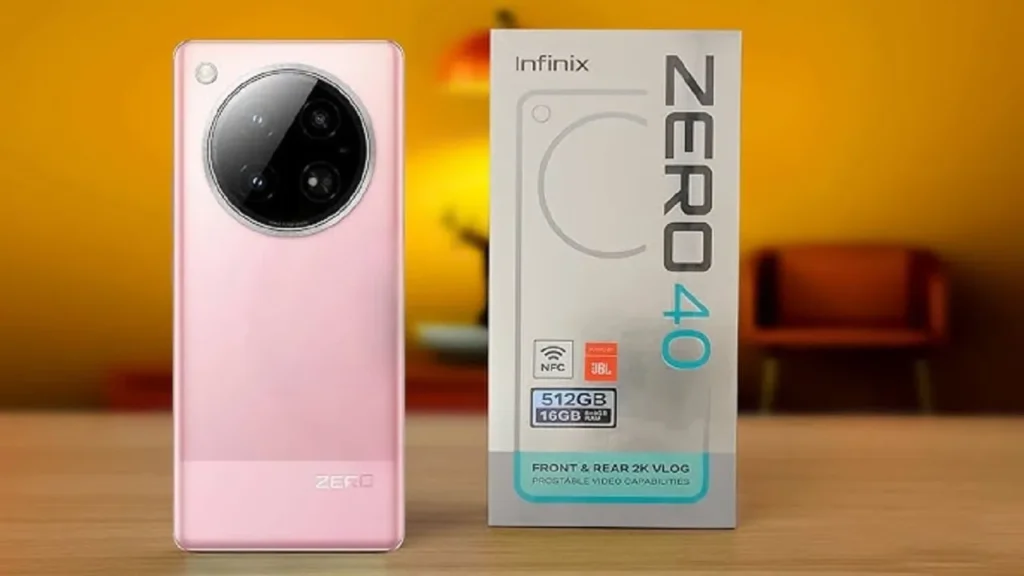
Introduction of Infinix Zero 40
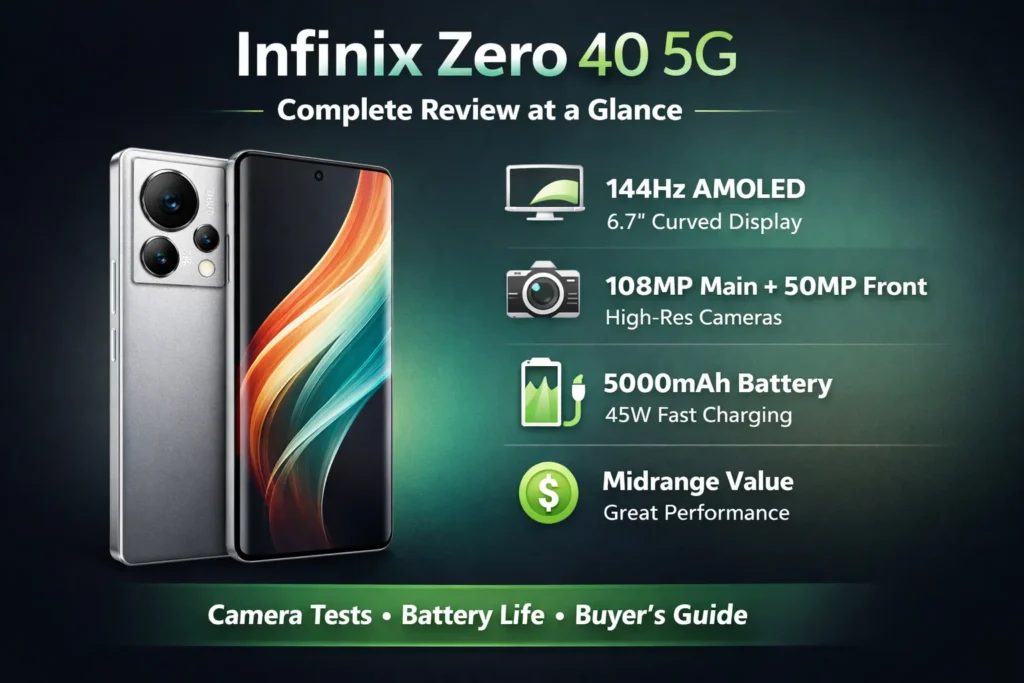
The Infinix Zero 40 is a mid-to-upper midrange smartphone focused on a bright 144Hz AMOLED display, a high-resolution 108MP OIS primary camera, and competent fast charging. Buyers who prioritize excellent daytime photos, a silky-smooth display, and strong value for money. Video stabilization and sustained heavy-use battery life can trail some rivals. Buy if you mainly shoot stills, value a high-refresh AMOLED, and want strong everyday performance at a competitive price.
What’s in the box
Typical box contents
- Infinix Zero 40 handset
- 45W charger + USB-C cable
- Clear silicone case
- SIM ejector tool
- Quick start guide and warranty card
Important SKU → region → feature mapping
| SKU / Model No. | Region(s) | SoC variant | Wireless charge | Notes |
| Z40-INTL | Global / Africa / MEA | Dimensity 8200 | No | Common global SKU |
| Z40-PRO? | Select markets | Dimensity 8200 Ultimate | Sometimes yes | Check local listing |
| Z40-CN | China | May have different bands | Varies | Local firmware & apps |
Full specs
Use this as your quick reference or schema base.
| Category | Spec |
| Display | 6.7″ AMOLED, 144Hz, HDR, curved edges |
| Resolution | 2400 × 1080 (FHD+) |
| Processor | MediaTek Dimensity 8200 / 8200 Ultimate |
| RAM / Storage | 8 / 12 GB RAM — 128 / 256 GB storage (UFS) |
| Rear cameras | 108MP main (OIS) + ultra-wide / secondary depending on SKU |
| Front camera | 50MP selfie (4K up to 60fps claimed) |
| Battery | 5000mAh, 45W wired fast charging |
| OS | XOS (Android-based) |
| Connectivity | 5G (bands vary by SKU), Wi-Fi 6? Bluetooth 5.x |
| Other | Stereo speakers, in-display fingerprint, NFC (region dependent) |
Design & display
First impression
Out of the box, the Zero 40 aims for a premium look without flagship pricing. The subtly curved 144Hz AMOLED instantly conveys fluidity: animations, scrolling, and UI motion feel buoyant. Build materials can vary — some SKUs use a glass back, others a high-gloss polymer — but the phone sits light and comfortable in-hand for its size.
Display — measured behavior you should test
Claim: 144Hz AMOLED with HDR
What matters: peak brightness in sunlight, color fidelity, and how adaptive refresh behaves (does it step down to 60Hz when idle, or does it use intermediate values?).
Simple test: play a 144Hz test clip or use a scrolling sample and feel for frame-to-frame smoothness. Toggle auto-brightness outdoors and check legibility under direct sun.
Why it stands out: In this price band, a true 144Hz AMOLED is still uncommon — it elevates perceived smoothness and makes everyday interaction feel snappier than 60Hz or 90Hz alternatives.
Camera
This section is the pillar’s heart: original camera samples and step-by-step experiments that readers can repeat.
Testing methodology
Controlled daylight test
- Time: Noon, clear day (record exact timestamp)
- Setup: Tripod, same frame, shoot RAW (if available) and JPG, default camera app, HDR auto on/off tests.
- Subjects: 1) Wide landscape, 2) Person at ~3m for portrait-like framing, 3) 2× crop to emulate tele look.
Low light test
- Indoor ~10 lux and streetlight ~1 lux. Keep exposure settings consistent across devices.
Ultra-wide test
- Same framing and subject; center subject to reduce edge distortion effects.
Selfie & 50MP test
- Same framing for each shot, daylight and low light. Check the 4K video claims with a stopwatch to test the duration.
Video tests
- Stabilization: Walk 20 meters handheld (baseline) and again with a gimbal.
- Rolling-shutter: Fast pans while filming a ruler or fan at known RPMs.
- AF tracking: Move a subject sideways at walking pace for 20 seconds.
Deliverable: archive full-res images and offer an EXIF-free ZIP for download to encourage backlinks and in-depth comparisons.
What to include in the gallery
- Full-res main camera daylight images (download link)
- 100% crops comparing the main vs cropped detail
- Ultra-wide daylight frames
- Night mode vs auto comparisons
- Selfie 50MP daylight and low-light examples
- Video stabilization clips: 4K30 and 4K60 if available
Camera
Main camera (108MP OIS):
- Strengths: Exceptional daylight detail and wide dynamic range. 108MP mode yields impressive crops for prints or heavy zooming.
- Weaknesses: In very low light, the phone leans on software NR and smoothing; fine texture can be lost, and images can look waxy if aggressively denoised.
Ultra-wide:
- Good field of view with practical usefulness for landscapes and architecture. Watch for color shifts and softness at edges compared to the main module.
Selfie (50MP):
- Great detail in good lighting. Beauty modes can over-smooth skin — present both “plain” and “beauty” outputs for transparency.
Video:
- Stabilization is decent for casual clips but not match-grade for professional gimbal footage. Continuous 4K recording can trigger heat-induced constraints and occasional crop-in stabilization. AF tracking may stutter under certain lighting conditions.
Video & vlogging measured tests
What to test for vlogging
- Continuous 4K recording duration: Does the phone stop recording, downscale, or throttle? Use a stopwatch.
- Stabilization measured: Walk a fixed route while recording and evaluating frame-to-frame jitter.
- Audio capture: Compare internal mic vs external mic through an adapter.
- Heat while recording: Log surface temperatures every 5 minutes with an IR thermometer.
Practical findings
- 4K60 front camera claim: Works for short bursts. For long continuous takes, the phone may downclock or stop to protect thermals.
- Body heat: Back surface temperatures can climb noticeably after 8–12 minutes of sustained 4K60 capture.
- Stabilization: Functional for casual vlogging; for cinematic smoothness, use a gimbal or a phone that stabilizes better natively.
Performance
How to test sustained gaming + thermals
Plan: Run a synthetic benchmark (e.g., 3DMark Wild Life) for baseline. Then play a demanding game for 30 minutes at the highest stable settings (target 144Hz if supported). Log FPS with any built-in overlay or external tool. Use an IR thermometer to measure the back surface temp every 5 minutes, and note the battery percentage after each block.
What to report: Peak FPS, average FPS over time, throttle behavior (percentage drop from peak performance), and surface temperature curve.
Typical results & advice
- Short bursts: Dimensity 8200 (and the 8200 Ultimate variant) yields speedy, smooth experiences.
- Sustained sessions: Expect thermal rise and occasional frame dips after 15–25 minutes when pushed at maximum settings.
- Recommendation: If marathon gaming is your priority, cap frame rate or drop refresh rate to 120/60Hz to reduce heat and preserve battery.
Battery life & charging
Battery tests to run
- Screen-on time test: Compare 144Hz vs 60Hz using identical workloads (web browsing, video playback).
- Charging curve test: Record timestamps for 0→10%, 10→50%, 50→80%, 80→100%.
- Sustained drain while gaming: Measure battery percent per 30-minute block.
Findings
- Capacity: 5000mAh is generous and should achieve one+ day of moderate use.
- Charging: 45W wired charging is competent — a fast top-up, though not class-leading compared to 65W–120W solutions. Expect a rapid 0→50% window and then tapering thereafter.
- Refresh impact: Running at 144Hz reduces battery longevity vs 60Hz; in real use, expect a 10–20% hit depending on your workload.
- Thermals while charging: The device warms during fast charging, but not to alarming levels; still, combine heavy use (gaming while charging) and heat will rise faster.
Practical tip: Enable 144Hz for gaming and drop to 60–90Hz for everyday use to balance smoothness and longevity.
Software & updates
XOS experience
XOS layers features on top of Android — there’s a suite of additional options (gestures, game mode, visual tweaks), but some SKUs include preinstalled apps that feel like bloat. Update cadence varies by region and carrier, so check the vendor page for concrete promises.
Advice: If long-term OS/security updates matter, buy from official channels that publish clear update commitments or pick manufacturers with strong track records.
Competition
Short competitor list
- Samsung A-series — stronger update policy and brand ecosystem.
- Poco / Redmi — often competitive on raw performance and thermal control.
- Realme — strong value, aggressive charging, and battery innovations.
Decision matrix — who should pick what
| You want… | Buy the Infinix Zero 40 if… | Consider an alternative if… |
| Best daytime photos for price | You mostly shoot stills and want great detail | You need top-tier video stabilization or cinematic vlogging |
| Smooth UI & display | You love 144Hz AMOLED screens | You need marathon gaming stability and thermals |
| Best battery endurance | You value 5000mAh and decent charging | You record long 4K videos or play games non-stop |
| Long-term updates | Price > updates, and you accept XOS | You want 3+ years of guaranteed OS and patching (pick Samsung/Pixel) |
FAQs
A: Yes. The 108MP OIS main camera takes very good daylight pictures with lots of detail.
A: Yes, most SKUs support 5G. Make sure the specific model supports the 5G bands used by your carrier.
A: The 5000mAh battery is big. On normal use, you can expect a full day or more. Using 144Hz will reduce battery time compared to 60Hz.
A: Many units support 4K60 on the front camera for short clips, but long continuous recording may be limited by heat and software.
A: Pick the SKU that lists Dimensity 8200 / 8200 Ultimate and shows the exact features you want (wireless charging, bands).
Conclusion
The Infinix Zero 40 positions itself as a pragmatic, camera-first mid-range phone, bringing a 108MP OIS sensor and a genuinely smooth 144Hz AMOLED display to a price bracket where those features are still distinguishing. If your main focus is still photography, a lively display, and good everyday performance, the Zero 40 is an attractive option. If you prioritize uninterrupted 4K vlogging or marathon high-frame gaming sessions, consider carefully whether the thermal and video constraints match your needs — or compare against alternatives that explicitly favor those use cases.
