
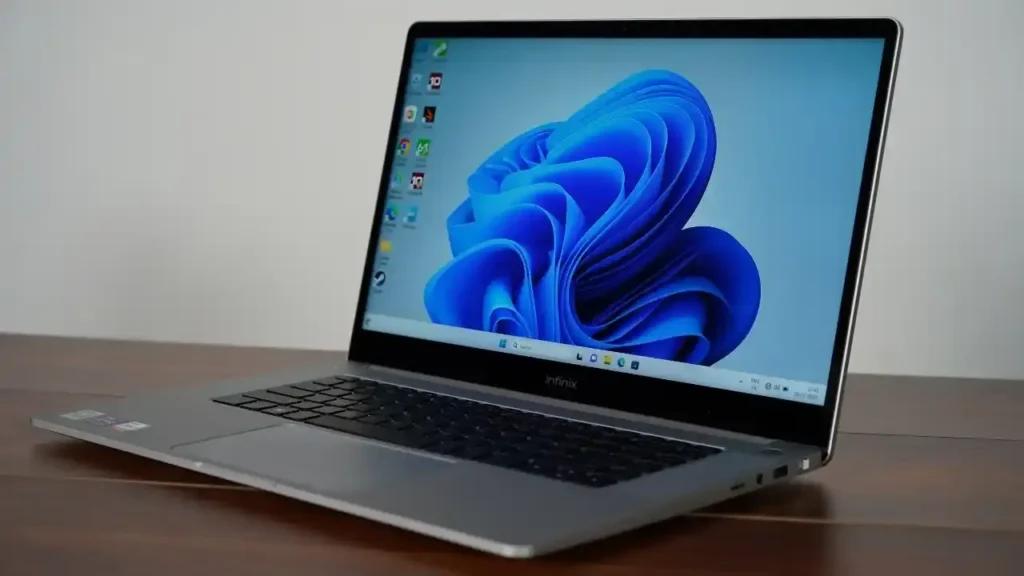
Introduction of Infinix ZeroBook 13
The Infinix ZeroBook 13 price in Pakistan is one of the most searched laptop queries right now because this model sits in a very interesting spot in the market. It is not a basic office laptop, and it is not a full gaming notebook either. Instead, it targets people who want a fast, modern, premium-looking Windows machine with strong CPU performance, decent battery life, useful ports, and a thin-and-light body that still feels practical for everyday work.
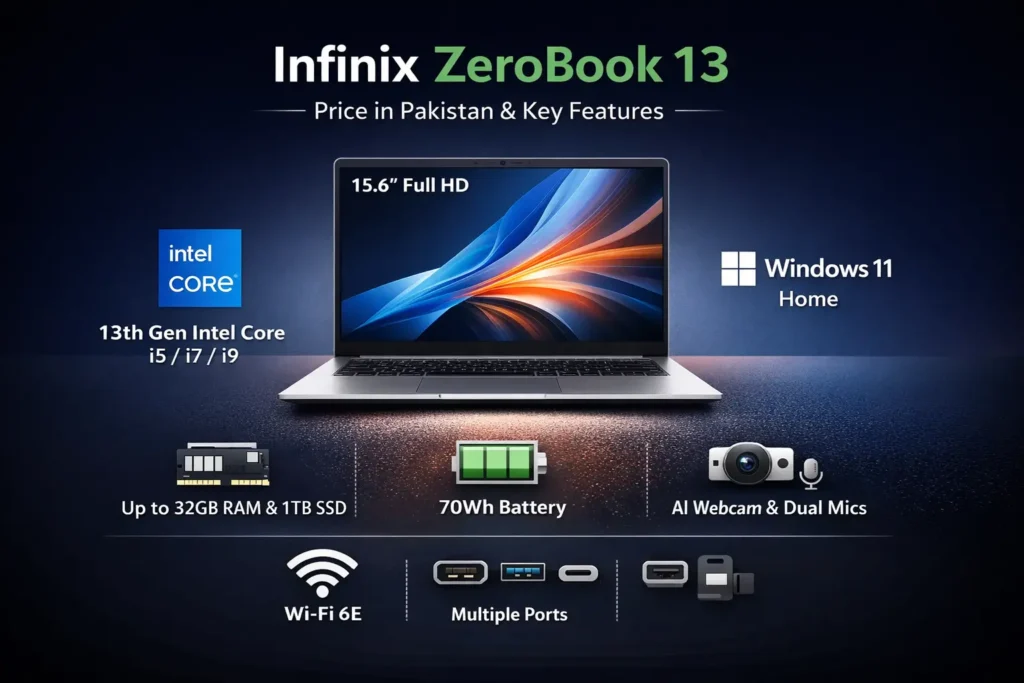
Infinix has built the ZeroBook 13 as a performance-first machine for users who value responsiveness, multitasking, and portability. The laptop is powered by 13th Gen Intel Core i5, i7, and i9 H-series processors, comes with a 15.6-inch FHD display, supports Wi-Fi 6E, runs Windows 11 Home, and includes a 70Wh battery. It also carries the model code ZL513, which appears frequently in retail listings and search results. These details make the ZeroBook 13 an appealing choice for students, office users, freelancers, content creators, and buyers who want more horsepower than a typical budget laptop can offer.
Infinix ZeroBook 13 at a glance
Before going deeper, here is the clean snapshot that most buyers want first.
The official product name is ZERO BOOK 13, although real-world search and retail language also use ZeroBook 13, Zerobook 13, and the model code ZL513.
The processor family includes 13th Gen Intel Core i5, Core i7, and Core i9 H-series chips, with official promotional material highlighting up to 14 cores and 20 threads and an OVERBOOST mode that can push output up to 54W.
The memory and storage story depends on the variant, but official material points to up to 16GB LPDDR5 and up to 1TB PCIe 4.0 SSD, while launch coverage in some markets also mentions higher configurations such as 32GB RAM and 1TB SSD.
The display is a 15.6-inch Full HD panel, and the official product story emphasizes 100% sRGB and 400 nits brightness.
The battery is 70Wh, paired with a 100W Type-C charger in the broader product narrative.
The connectivity package includes Wi-Fi 6E, Bluetooth 5.2, USB-A, USB-C, HDMI 1.4, an SD card slot, and a 3.5mm audio jack.
The operating system is Windows 11 Home.
That combination already tells you why this laptop gets attention. It is trying to deliver a high-value balance of speed, portability, and modern features rather than chasing one flashy spec.
What is the Infinix ZeroBook 13?
The Infinix ZeroBook 13 is a slim productivity laptop designed for users who want desktop-like speed in a relatively portable shell. Infinix positions it as a member of its ZERO BOOK series, and the branding language is clearly performance-oriented. The laptop is marketed for work, study, content creation, multitasking, and people who want a more premium experience than entry-level Windows machines usually provide.
At a practical level, the ZeroBook 13 is built around a simple promise: more raw CPU power, more modern connectivity, and more battery capacity than most thin laptops in this price range. That is why it is attractive to users who need fast application switching, browser-heavy workflows, Office work, light photo editing, video calls, coding tasks, and occasional creative work. It is not a machine that screams “gaming laptop.” It is a machine that says, “efficient productivity device with serious processing headroom.”
The product also includes extra software and AI-flavored features that strengthen the daily-use experience. Infinix highlights tools like AI BeautyCam, Face Tracking, Background Blur, dual-mic AI noise cancellation, and Infinix PC Connection. These features matter because they match real user behavior. Many buyers today use their laptops for hybrid work, online classes, video calls, content sharing, and cross-device workflows. In that context, the ZeroBook 13 is not only about processor specs. It is about the overall interaction model.
There is also a value story behind the product. Infinix is not trying to compete with premium ultrabooks that cost far more. Instead, it is trying to offer a strong performance-to-price ratio. That is exactly why the ZeroBook 13 often appears in search intent clusters around phrases like “best laptop for students,” “value for money laptop,” “thin and light performance laptop,” an,d of course, Infinix ZeroBook 13 price in Pakistan.
Launch date, markets, and naming
The ZeroBook 13 was announced in India on 7 July 2023, and sales began on 11 July 2023 through Flipkart. Launch reporting showed that the series arrived in multiple configurations, including Core i5, Core i7, and Core i9 variants. Some launch coverage listed combinations such as 16GB/512GB, 32GB/1TB, and top-end SKUs that targeted buyers who wanted maximum CPU and memory headroom in the same chassis.
This launch structure matters because it explains why pricing and specs are so inconsistent across retail and search pages. The laptop was not released as a fixed configuration. It was released as a family of variants. That means two people may both say “ZeroBook 13,” but one may be referring to a Core i5 version and another may be talking about a higher-end Core i9 model. The buyer experience changes significantly depending on which version is being discussed.
The naming issue is also worth clarifying in any serious model page. The official Infinix website uses ZERO BOOK 13, while other sources and merchants write ZeroBook 13, Zerobook 13, or simply ZL513. That may look like a small detail, but in SEO it is a major entity-matching issue. Search engines connect brand names, model codes, and variant references together. If your article explains all of them clearly, it becomes easier for both users and search systems to understand that they are dealing with the same product family.
Infinix ZeroBook 13 price in Pakistan
The most important part of the buying decision is obviously the Infinix ZeroBook 13 price in Pakistan. This is where many pages become weak because they either copy an outdated number or mention a global launch price that does not reflect the local market. Pakistan is different because the laptop often appears through import-style listings, reseller pages, or market-specific stock rather than a single, unified official retail channel.
That means the price is highly dependent on the exact configuration. A Core i5 version will obviously cost less than a Core i7 or Core i9 version. Likewise, a 16GB/512GB model will usually sit below a 32GB/1TB variant. Import margins, exchange rate movement, stock availability, and seller policy all influence the final number a buyer sees.
Recent Pakistan-facing listings show that the model does not have a single stable price tag. A Core i7 / 32GB / 1TB version has been listed around PKR 239,365, while a Core i9 / 32GB / 1TB listing has appeared around PKR 274,230. That spread makes one thing very clear: the ZeroBook 13 should be treated as a configuration-sensitive product, not a one-price-fits-all laptop. The Infinix ZeroBook 13 price in Pakistan varies depending on the CPU tier, RAM, storage, and seller source. Buyers should verify the exact configuration before paying, because the Core i5, Core i7, and Core i9 variants can differ significantly in value and availability.
Design and build quality
The design of the ZeroBook 13 is one of the first things people notice. It does not look like a generic office laptop. Infinix has given it a more dramatic, creator-oriented personality. The chassis is thin, modern, and visually distinct enough to stand out in a crowded market of plain silver notebooks. The official product story highlights a meteorite phase design and a rear hinge light that activates with OVERBOOST mode, which adds a touch of visual flair without going overboard.
According to the official specifications, the laptop is about 16.9mm thin and weighs around 1.8kg. That places it in a very practical zone. It is light enough to carry around for class, office, or co-working sessions, but still substantial enough to feel like a real 15.6-inch performance machine rather than a tiny ultraportable. In other words, it occupies the middle ground between mobility and usable screen size.
There is, however, a practical ergonomics note to keep in mind. Some reviewers observed that the keyboard and trackpad can feel a bit cramped relative to the 15.6-inch body size. That does not make the laptop bad, but it does mean the design prioritizes a slim footprint over ultra-roomy input hardware. Buyers who type all day should pay attention to that detail.
Display
The display is one of the most important usage factors in any laptop buying guide, and the ZeroBook 13 has a mixed but generally positive story here. On paper, Infinix gives it a 15.6-inch Full HD panel, with 100% sRGB and 400 nits brightness in the official messaging. That is a Respectable Specification for productivity, streaming, general browsing, and light creative work.
Review coverage, however, provides a more grounded real-world picture. That distinction matters a lot. A display can be perfectly acceptable for normal use without being a true professional panel. It is important not to overstate what the screen can do.
So the best honest verdict is this: the ZeroBook 13 display is good for general productivity, entertainment, and standard creative tasks, but it is not a high-refresh gaming panel, and it is not the type of display that professional color editors should automatically trust without calibration. That is not a weakness unique to this laptop; it is simply the trade-off that many performance laptops make in this price bracket.
Performance
Performance is the reason the ZeroBook 13 gets searched so heavily. This is the area where the product’s identity becomes clear. Infinix positions the laptop around 13th Gen Intel Core i5, Core i7, and Core i9 H-series processors, and that alone tells you the category it wants to play in. H-series processors are typically stronger than low-power U-series chips, which means the laptop is built for sustained productivity and heavier workloads rather than ultra-low-power simplicity.
The official promotional material emphasizes up to 14 cores and 20 threads, plus an OVERBOOST mode that can push power output to 54W. That includes Core i5, Core i7, and Core i9 options, with memory and storage combinations such as 16GB/512GB and 32GB/1TB, depending on the market and variant. This is another reason the naming and configuration details matter so much. The same laptop family can feel very different based on the chosen specification tier.
Benchmark references also help frame the performance story more concretely. Public Geekbench submissions for the ZeroBook 13 using the Intel Core i9-13900H show strong single-core and multi-core performance ranges, with results varying based on operating system, power mode, and thermal conditions.
Battery and charging
Battery life is another major selling point of the ZeroBook 13. Infinix pairs the laptop with a 70Wh battery, which is a solid capacity for a 15.6-inch productivity laptop. The company also claims up to 10 hours of 1080p video playback and about 2 hours for a full recharge with the 100W Type-C charger.
Those are strong numbers, especially for a machine built around H-series Intel processors. Buyers in this segment often expect power-hungry hardware to come with weak endurance. Infinix is clearly trying to challenge that assumption by pairing performance with a fairly large battery and fast charging support. From a product-positioning perspective, that is smart.
Real-world reviews tend to be more conservative than the brand claim, which is normal. In everyday use, such as browsing, research, writing, and general productivity, the laptop has been reported to last more than six hours in lighter modes. That is a useful real-life benchmark because it feels believable and practical. It is not the kind of endurance you would expect from a low-power ultraportable, but it is respectable for a performance-focused 15.6-inch device.
Another important detail is that charger-in-box behavior can vary by market. Infinix’s broader product messaging may include a 100W Type-C charger, but region-specific bundles do not always line up perfectly. That is why any buyer-focused article should clearly say that charging accessories may differ depending on the country and seller.
Webcam, microphones, and speakers
This laptop is clearly designed with remote work and communication in mind. Infinix promotes an AI BeautyCam with Face Tracking and Background Blur, which makes the device more appealing for video meetings, online teaching, livestream communication, and content creation. These are not niche gimmicks. In a world where people use their laptops for meetings every day, a decent camera and software-assisted framing can make a real difference.
The mic setup is also part of the value proposition. The laptop includes a dual-mic array with AI noise cancellation, which should help voice pickup in noisy environments. That matters for students in shared spaces, professionals in open offices, and anyone who joins calls from a less-than-perfect room. Even if the camera is decent, poor audio can ruin a meeting, so the inclusion of stronger microphone processing is a real plus.
Audio output is another pleasant surprise. Infinix says the ZeroBook 13 uses a quad-speaker setup, with a mix of high-frequency and low-frequency units. In practical use, that means the laptop should be more satisfying for media playback than many slim notebooks in the same bracket. Review notes generally support the idea that the speakers sound good when the laptop is placed on a hard, stable surface.
Ports and connectivity
One of the strongest advantages of the ZeroBook 13 is its port selection. Many thin laptops look attractive but force users into dongle life. The ZeroBook 13 is more practical than that. It includes Wi-Fi 6E, Bluetooth 5.2, USB-A, USB-C, HDMI 1.4, SD card support, and a 3.5mm headphone jack. That is a genuinely useful mix for creators, students, and office workers alike.
The port set matters because it reduces friction. You can connect accessories, external displays, storage devices, card readers, wired headphones, and adapters without constantly hunting for extra hardware. This is particularly useful for people who work in mixed environments. One day they are at home, the next day in an office, and the next day in a classroom or studio. A laptop with flexible ports adapts better to that rhythm.
Wi-Fi 6E is also a meaningful modernization step. It gives the device more future-facing wireless capability, especially in environments that support the 6GHz band. Bluetooth 5.2 is similarly practical for pairing wireless mice, keyboards, earbuds, and other accessories. In simple language, the ZeroBook 13 is equipped to behave like a current-generation laptop rather than an outdated holdover.
Infinix also leans heavily into cross-device software features. The company highlights Infinix PC Connection, phone-laptop pairing, file sharing, mirroring, and other ecosystem-style tools. For users who already own an Infinix phone, these extras may make the laptop feel more integrated into their digital routine. For everyone else, they are still nice-to-have features rather than the main reason to buy.
Software and support
The software side of the ZeroBook 13 is straightforward, which is usually a good thing. The laptop ships with Windows 11 Home, and that keeps the experience familiar and broadly compatible. For most buyers, this is exactly what they want: a normal Windows machine that can run browsers, office tools, coding tools, communication apps, and creative software without friction.
Infinix also provides an official support ecosystem with manuals, downloads, service help, update tools, and service center access. That is important in a market like Pakistan, where after-sales confidence can shape buying decisions as much as raw specifications. A strong hardware product becomes more credible when the brand can also point users to support resources.
Pros and cons of the Infinix ZeroBook 13
Every serious buying guide should make the trade-offs clear, and the ZeroBook 13 has both real strengths and real limitations.
The biggest strength is performance. The laptop’s 13th Gen Intel H-series processors give it much more computational muscle than a typical entry-level notebook. That makes the device feel fast in day-to-day use and capable in heavier workloads. Another strength is the battery size, because a 70Wh battery is a respectable power reserve for this class.
The design is another positive. The ZeroBook 13 has a premium, creator-style look that stands out from plain business laptops. The hinge light, the thin body, and the overall aesthetic give it a more distinctive identity.
The weaknesses are also real. The display, while good for ordinary use, is still 60Hz in review coverage and not the best choice for color-critical professionals. The keyboard and touchpad may feel a little cramped for some users, especially considering the laptop’s 15.6-inch size. The speaker placement is not equally ideal on soft surfaces. And the biggest limitation from a performance perspective is the lack of a dedicated GPU, which means gaming and heavy graphical workloads are not its strongest area.
That is why the ZeroBook 13 is best understood as a performance productivity laptop, not a universal do-everything machine.
Who should buy the Infinix ZeroBook 13?
The ZeroBook 13 makes the most sense for buyers who care about speed, multitasking, and everyday productivity. Students with heavy workloads, office professionals, freelancers, writers, marketers, coders, and light creators are the most obvious audience. These are the users who benefit from a faster CPU, a large-ish battery, and a practical port mix without needing a premium-brand price tag.
It also fits people who want a laptop that feels more capable than a standard budget notebook. If your daily routine includes browser tabs, Office files, calls, downloads, editing tools, and constant switching between apps, this laptop is likely to feel pleasantly responsive. It is built for people who dislike waiting.
Another good match is the user who values convenience. The combination of USB-A, USB-C, HDMI, SD slot, Wi-Fi 6E, and Windows 11 Home means the ZeroBook 13 is easy to plug into real life. You can connect displays, cards, accessories, and networks without too much drama. For many users, that is more important than having a super-thin chassis with too few ports.
Who should skip it?
The ZeroBook 13 is not for everyone, and being honest about that makes the article more useful.
If you want a serious gaming laptop, this is not the best option. The integrated graphics are fine for light and moderate use, but they do not replace a dedicated GPU. People who want modern AAA gaming, high-refresh esports performance, or graphical rendering power should look elsewhere.
If you are a professional who needs high-end color accuracy for photography, print design, or video grading, this may also not be the ideal primary machine. The screen is good enough for most people, but review coverage does not present it as a precision-grade creative panel.
And if you care more about a polished, ultra-refined ultrabook experience than raw CPU value, then some mainstream alternatives may feel more balanced in areas like trackpad feel, display refinement, or overall brand support.
Comparison notes and practical alternatives
Compared with older ZeroBook models, the 13th-gen version is mostly about stronger CPU performance. The body language of the laptop remains similar, but the internals are where the real improvement sits. That is important because many buyers assume a newer model means a dramatic redesign. In this case, the more important shift is under the hood.
When compared against other laptops in the same broad category, the ZeroBook 13 is best thought of as a value-performance option. It is not trying to be the most luxurious laptop in the room. It is trying to deliver more processing headroom for the money. That is an appealing proposition in a market where many thin-and-light machines compromise heavily on speed.
For a Pakistan-first model page, the most effective angle is not hype. It is clarity. The user wants to know what the laptop is, which variant is being sold, what it actually costs locally, how long the battery lasts, how strong the performance feels in real life, and whether the compromises are acceptable. That is the kind of content that helps readers make a decision and also helps search engines understand the value of the page.
FAQs
The series was announced on 7 July 2023 and went on sale in India on 11 July 2023 via Flipkart.
Recent Pakistan-facing listings vary by configuration. One listing shows the Core i7 / 32GB / 1TB version at around PKR 239,365, while another shows a Core i9 / 32GB / 1TB listing at around PKR 274,230. The actual price depends on the exact variant and seller.
Yes. The official battery is 70Wh, and Infinix claims up to 10 hours of 1080p playback with about 2 hours to full charge. Real-world light productivity use can be lower than the brand claim, but still decent for this class.
It can handle light and moderate gaming better than basic office laptops, but it relies on integrated graphics rather than a dedicated GPU, so it is not a true gaming laptop.
Launch coverage shows Core i5, Core i7, and Core i9 versions, with memory and storage combinations such as 16GB/512GB and 32GB/1TB, depending on market and configuration.
Final verdict
The Infinix ZeroBook 13 is a compelling laptop for buyers who want strong CPU performance, a good-sized battery, useful ports, and a modern Windows experience without moving into premium flagship pricing. It is especially appealing for productivity-heavy users who care more about speed and practicality than about gaming features or ultra-fancy screen technology.
It is not flawless. The display is not a high-refresh panel, the keyboard and trackpad are not the roomiest, and the integrated graphics limit gaming and heavy creative workloads. Still, the overall package is impressive because it gives you a lot of usable performance in a design that feels more premium than many people expect at this level.
For a Pakistan-focused buyer page, the smartest strategy is to be direct and transparent. Lead with the Infinix ZeroBook 13 price in Pakistan, explain the model naming clearly, show the launch context, and describe the real strengths and limitations in simple language.
