
Introduction
The Infinix Hot 8 Play is a simple, entry-level Android phone aimed at people who want a long-lasting battery and an affordable price. It’s a practical device for students, grandparents, first-time smartphone buyers, or anyone who needs a dependable second phone. The core idea behind the Hot 8 Play is straightforward: give you a big power pack, a big screen for watching videos, and a plain but useful camera — all without costing a lot.
At-a-glance specs
| Feature | What you get |
| Model | Infinix Hot 8 Play |
| Display | ~6.0–6.6″ HD+ (large, easy to read) |
| SoC | Entry-level MediaTek or Unisoc (varies by region) |
| RAM | 2GB / 3GB / 4GB options (region-dependent) |
| Storage | 32GB / 64GB + microSD slot |
| Battery | Large capacity (often ~5000 mAh or larger) |
| Rear camera | Single or dual camera (e.g., 8MP main + QVGA/AI lens) |
| Front camera | 5MP–8MP |
| OS | Android with XOS skin |
| Connectivity | 4G LTE, Wi-Fi, Bluetooth, GPS (bands vary) |
| Extras | Face unlock, rear fingerprint (on some variants) |
| Price (at launch) | Budget / entry-level price bracket |
Design & Build — what it feels like
Look and feel
The Infinix Hot 8 Play follows the usual budget phone playbook: plastic body, a big display, and a chunky profile because of the battery inside. It’s built with cost and utility in mind, not luxury. That means you get a light gadget for its battery size, but it’s thicker than premium phones.
Everyday handling
- The textured or glossy back helps hide fingerprints and keeps the phone looking clean.
- Physical buttons — power and volume — sit on the right edge and are easy to use.
- A rear fingerprint sensor appears on some variants; others rely on software face unlock.
- Expect a modest weight and a practical, sturdy feel rather than a fragile, glassy premium look.
Practical tips
- Use a slim case with grip — it helps protect the corners and keeps the phone in one piece if dropped.
- Add a screen protector: many low-cost models don’t include high-end glass protection, so this helps avoid scratches.
- If you like thin phones, this won’t be your pick. If you like many hours of battery life, the size trade-off is reasonable.
Display
What to expect
The Hot 8 Play usually ships with an HD+ display, which is common for budget phones. That means text and icons are clear for everyday use, but not as crisp as Full HD screens. The large screen size (around 6.0–6.6 inches) is great for watching videos, browsing social feeds, and reading.
Brightness and color
- Indoors, brightness is usually fine.
- Outdoors in bright sunlight, the screen can be harder to read.
- Colors may be slightly punchy — often tuned to look good on social media photos and video.
Practical display tips
- Turn on adaptive brightness to save battery.
- Choose larger text in settings if you want easier reading.
- Lower screen timeout when you want to maximize battery life.
Performance
What the specs mean
The Infinix Hot 8 Play ships with entry-level processors (MediaTek or Unisoc) and modest RAM. That setup handles everyday tasks like messaging, social apps, browsing, and video playback very well. Heavy multitasking or high-end 3D gaming is where the phone shows its limits.
Real-world behavior
- Apps such as WhatsApp, Facebook, Instagram, and YouTube run smoothly.
- Switching between many heavy apps (like several browser tabs plus games) can cause slowdowns on lower-RAM versions.
- Casual games (puzzle games, 2D titles) run fine. Intensive 3D games need reduced graphics settings and may stutter.
How to make it feel faster
- Choose the higher RAM option (3GB or 4GB) if available.
- Keep fewer apps in the background and close unused apps.
- Disable or remove unused bloatware to free storage and RAM.
Battery life
This is where the Infinix Hot 8 Play shines. The phone usually includes a large battery (around 5000 mAh or more). Because of that, the device gives long screen-on time (SoT) and very comfortable day-to-day endurance.
Expected battery performance
- Light use — calls, messaging, and occasional social browsing: 2 days or more possible.
- Mixed use — social apps, video streaming, and some web browsing: a full day to a day and a half.
- Heavy use — gaming and long video sessions: still respectable, but will drain faster.
Charging
Many budget models ship with standard (not super-fast) chargers. That means charging may take longer (often 2–4 hours, depending on the charger). Fast charging is usually not the main selling point on entry-level models.
Battery-saving tips
- Turn off location, Bluetooth, and background app refresh when you don’t need them.
- Use battery saver modes and lower screen brightness.
- Charge overnight if you prefer a full battery in the morning.
Camera
Camera reality check
The cameras on the Infinix Hot 8 Play are made for simple snapshots — social posts, selfies, and video calls — not for professional photography. In daylight, you’ll get okay-to-good pictures. In low light, expect noise, grain, and loss of detail.
Typical strengths
- Daytime photos look decent and shareable.
- Colors can be vivid and pleasing on social feeds.
- The front camera handles selfies and video calls fine.
Typical weaknesses
- Low-light shots are noisy and lack detail.
- The dynamic range (bright and dark areas in the same shot) is limited.
- Video stabilization and high-res recording are not advanced features on most variants.
Camera tips
- For best results, shoot in daylight.
- Use HDR mode for scenes with bright sky and darker foregrounds.
- Keep the phone steady in low light — use a steady surface if you don’t have a tripod.
Software & UI
Software experience
The Hot 8 Play runs Android with Infinix’s XOS skin. XOS adds features, themes, and utility apps. While this can be helpful, XOS often includes preinstalled apps that some users consider bloatware.
What you’ll see
- Extra utility apps and system tools that are meant to add features.
- The ability to change themes, icons, and system look.
- Occasional minor updates; major Android version upgrades are less common on very low-cost devices.
Tips for cleaner use
- Disable or uninstall apps you don’t need.
- Keep the system updated for security patches.
- If you want a simpler UI, you can install a lightweight launcher — but remember this uses additional storage and RAM.
Connectivity, sensors & extras
Connectivity basics
- 4G LTE support is common, but exact bands vary by region — check the model you buy.
- Wi-Fi usually covers 2.4GHz (802.11 b/g/n).
- Bluetooth and GPS are included; NFC is rare in this price class.
Sensors & extras
- Proximity and ambient light sensors are common.
- Some models include a rear fingerprint sensor; many provide face unlock via the front camera.
- A headphone jack is usually present, and most have a dedicated microSD slot for extra storage.
What to check on the box
- Confirm the charger type and whether a protective case or screen protector is included.
- Check warranty terms and the listed SKU for exact specs.
- Verify whether the variant supports your local 4G bands.
Benchmarks & numbers
Benchmarks like AnTuTu and Geekbench give a number that tries to show how fast a phone is. For budget devices like the Infinix Hot 8 Play, benchmarks are a rough guide. Real-world experience (app launch, multitasking, battery life) matters more than a single score.
How to interpret benchmark scores
- Use benchmarks to compare phones in the same price range.
- Don’t expect flagship-level numbers on an entry-level device.
- Look also at battery test results (video loop hours, screen-on time) for endurance clues.
Practical advice
- Read reviews that mix benchmark data with real-world tests (web browsing, video playback, gaming).
- Remember: a phone with a good battery and a moderate benchmark score often feels faster for everyday tasks than a low-battery phone with slightly higher synthetic scores.
Comparisons
The Infinix Hot 8 Play competes with other budget phones from brands like Tecno, itel, and older Xiaomi/Redmi entry-level models. When comparing, focus on:
- Battery: Hot 8 Play often leads with a larger capacity.
- Performance: Some rivals may use faster chips at a similar price.
- Camera: Competitors sometimes place a bit more emphasis here.
- After-sales: Local service and spare parts availability vary by brand and region.
Buying tip
Always compare the exact variant (chipset, RAM, storage), not just the model name. Manufacturers often release region-specific versions with different internal parts.
Buying guide
Where to buy
- Buy from reputable retailers, official brand stores, or authorized online shops to ensure warranty and genuine parts.
- Avoid too-cheap listings from unknown sellers that may be counterfeit or not covered by warranty.
What to check before buying
- Confirm the exact variant: RAM, storage, and processor.
- Verify supported network bands for your country.
- Check the warranty period and local service centers.
- Look for bundled accessories or offers (case, screen protector, discount).
After purchase, setup tips
- Update the system software immediately.
- Disable or remove unused apps to free up space.
- Set up cloud backup for contacts and photos.
- Install a lightweight launcher if you prefer a simplified home screen.
Pros & Cons
Pros
- Long battery life thanks to a large capacity battery.
- Very affordable — great value for basic tasks.
- Big display that’s good for video and social apps.
- Expandable storage via microSD.
- Simple, user-friendly software with extra features in XOS.
Cons
- Entry-level performance — not suited for heavy multitasking or high-end gaming.
- Weak low-light camera performance.
- Slow charging on models with basic chargers.
- Plastic build with a less premium feel.
- Limited major Android updates and occasional bloatware.
FAQs
A: Yes, if your main needs are long battery life, social apps, and video streaming.
A: In a normal, mixed-use, you can expect a full day or more. Light users may see two days on a single charge.
A: Casual and light games run smoothly. Heavy 3D titles will need low graphics settings and may stutter on the lowest-RAM models.
A: Most variants support 4G LTE, but network bands differ by region.
A: Some variants have a rear fingerprint sensor; many include face unlock through the front camera.
Final verdict
The Infinix Hot 8 Play is a solid pick if your top priority is long battery life and a low price. It’s ideal for students, seniors, first-time smartphone users, or as a backup device. It gives you the essentials — big display, dependable battery, and enough performance for everyday tasks — without asking you to pay a lot. If you need high-end performance, top-tier cameras, or very fast charging, look at mid-range or higher models. But if value and endurance matter most, the Infinix Hot 8 Play is a sensible choice.
Alt Text:
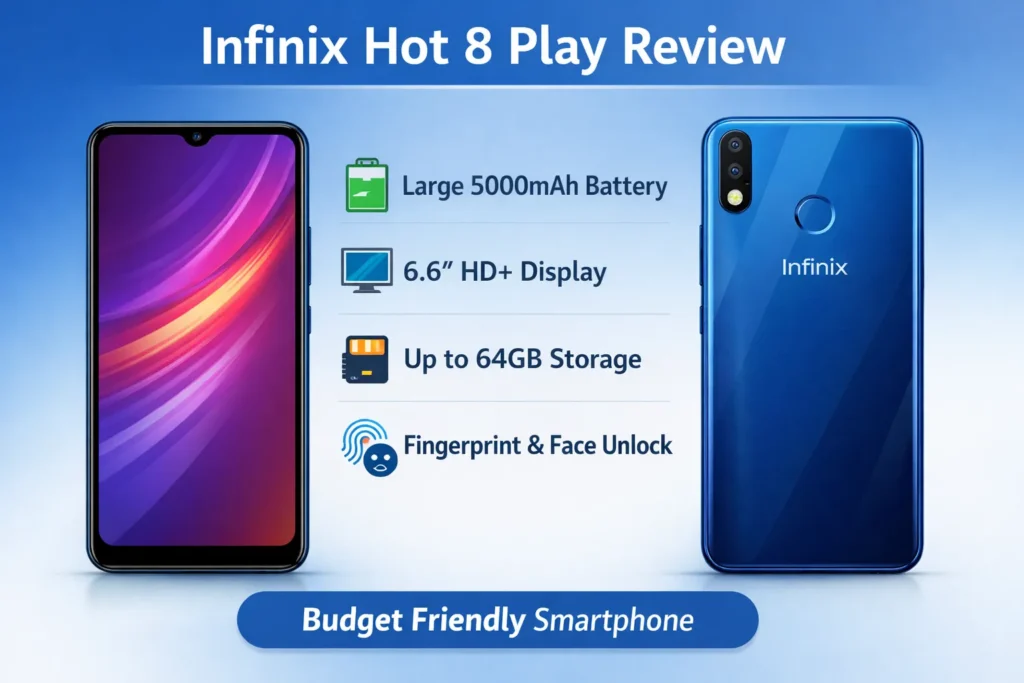
Infinix Hot 8 Play smartphone front and back view — sleek design with vibrant display, featured in a clean infographic for the full review and buyer’s guide.
Caption:
Explore the Infinix Hot 8 Play Review and Buyer’s Guide — discover specs, features, and reasons why this budget-friendly smartphone stands out in 2025.
